
Configure a fiscal calendar for your Power BI reports
This article describes how to configure a fiscal calendar for your Power BI semantic models. You configure your fiscal calendar on the Power BI Reports Setup page, and your settings flow through to each connected semantic model.
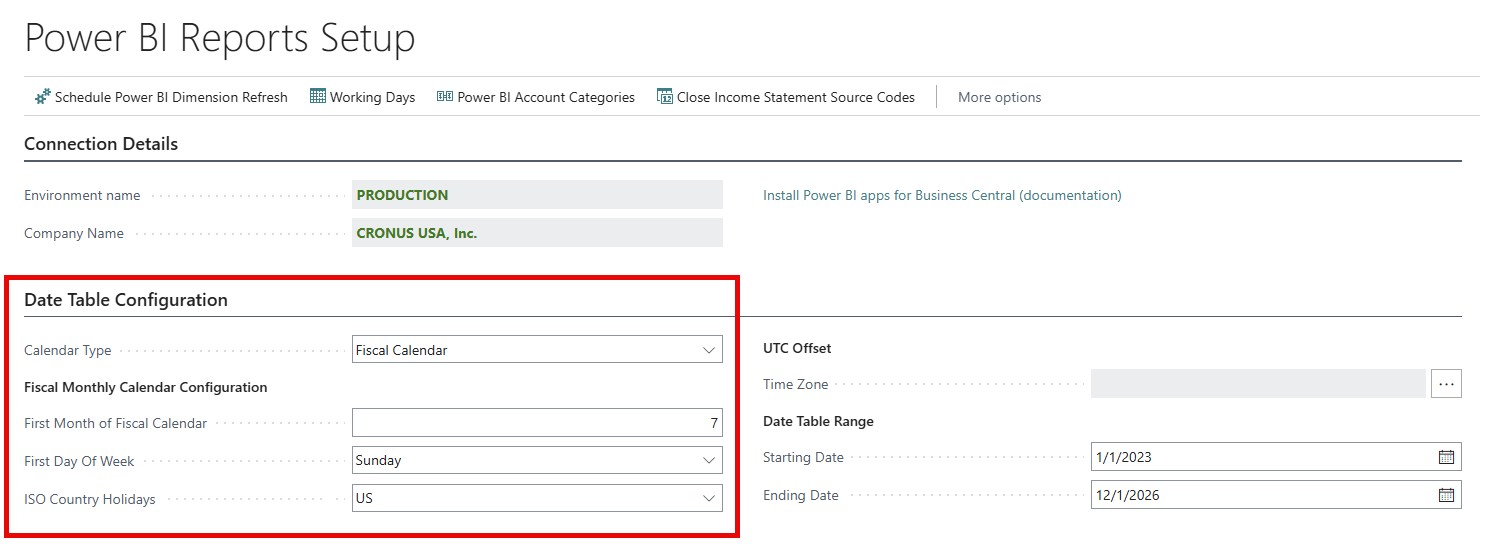
Set the calendar type for a fiscal calendar
Setting the Calendar Type field to Fiscal Calendar configures the Power BI date table to use a Gregorian month-based fiscal year structure, rather than the standard calendar year. Using this structure means:
- Fiscal years begin on the value in the First Month of Fiscal Calendar field.
- Fiscal months align to Gregorian calendar month boundaries.
- Power BI reports should use the fields for a fiscal calendar, such as Fiscal Year, Fiscal Month, Fiscal Quarter, and so on.
- You should use Fiscal Time Intelligence measures for period comparisons.
Specify the first month of your fiscal calendar
Use the First Month of Fiscal Calendar field to specify the calendar month in which your fiscal year begins. Enter the value as a number from 1 to 12, where:
- 1 represents January
- 2 represents February
- 3 represents March
- and so on...
For example, if your fiscal year begins in July, enter 7 in the First Month of Fiscal Calendar field.
Related information
Power BI Subscription Billing app
Overview of subscription billing