
Payroll release notes version 26.49.0.0 - 26.49.1.2
These release notes include supplemental information about payroll release version 26.49.0.0 - 26.49.1.2.
Overtime premium W2 box update
This release updates the overtime (OT) premium ledger mapping on the W-2 form from Box 12TT to Box 14 OT Premium. The change appears in the OT Premium Ledger W2 Box field on the US Setup FastTab of the Additional Payroll Setup page.

Tip
Tip:
You can access the Additional Payroll Setup page from the Payroll Setup page, which is available from Tell Me.
This change applies to the current reporting year. For the 2026 reporting year, the OT premium will be required to revert to Box 12TT in accordance with reporting requirements.
To learn more about how to initiate OT premium, go to Overtime Premium.
401K Conversion from Traditional to Roth
This release updates Sparkrock Impact 401K processing to automatically apply new age-based catch-up contribution limits for employees aged 60–63.
Traditional 401K contributions are made before tax, which reduces taxable income in the year of contribution. Taxes are paid when funds are withdrawn in retirement. Roth 401K contributions are made after tax, allowing qualified withdrawals to be tax-free in retirement.
To support automatic conversion of catch-up contributions from Traditional to Roth, on the Payroll Code Setup Card page of the Traditional 401K payroll code, add the Roth 401K Conversion Deduction Code on the Deduction Setup FastTab. This payroll code is used for catch-up contributions when an employee’s Social Security–applicable earnings exceed the prior-year threshold.
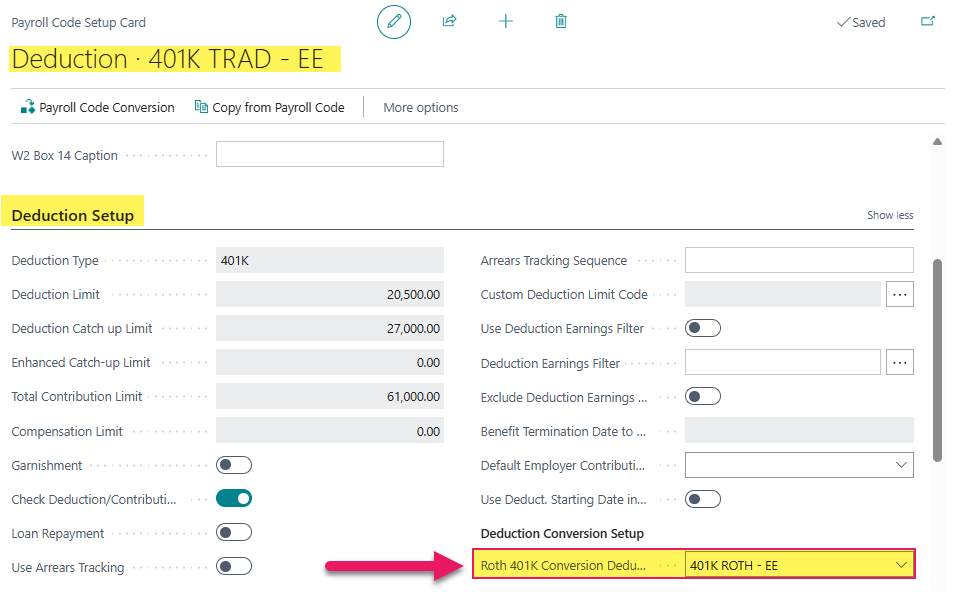
During automatic conversion of catch-up contributions, both the Traditional and Roth 401K payroll lines are set to Skip on Recalculate.
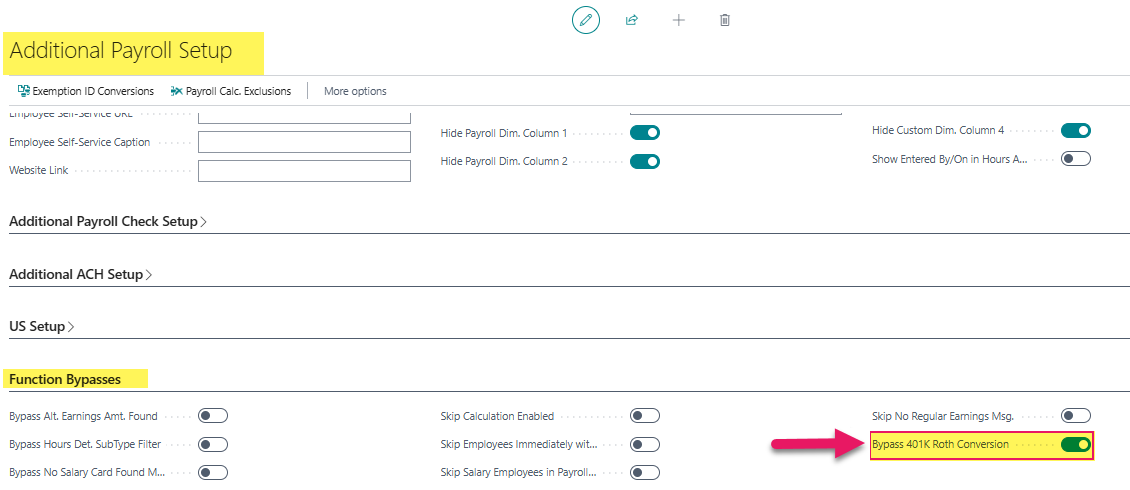
If your organization does not support Roth 401K contributions, this behavior can be bypassed. The Bypass 401K Roth Conversion setting is available on the Additional Payroll Setup page, on the Function Bypasses FastTab.
Tip
Tip:
You can access the Additional Payroll Setup page from the Payroll Setup page, which is available from Tell Me.
Canadian T4 XML file layout updates
This release introduces updates to the Canadian T4 XML file layout to align with updated Canada Revenue Agency (CRA) requirements.
Related information
Feedback
To send feedback about this page, select the following link: