
Update 28.1.2625.742 Published June 19, 2026
Periodically, Sparkrock may publish updates between major releases. All updates are cumulative.
Highlights
The following sections highlight the major accomplishments in this update.
Finance and Procurement
HR Management
Payroll Administration
Scheduling
New features and changes
Update 28.1.2625.742 for Sparkrock Impact 2026 release wave 1 introduces the following new features and changes.
HR Management
Hide employee date of birth from managers in mySparkrock
A new Hide Emp. DOB toggle is available in the External Setup section of the Advanced HR Setup page.
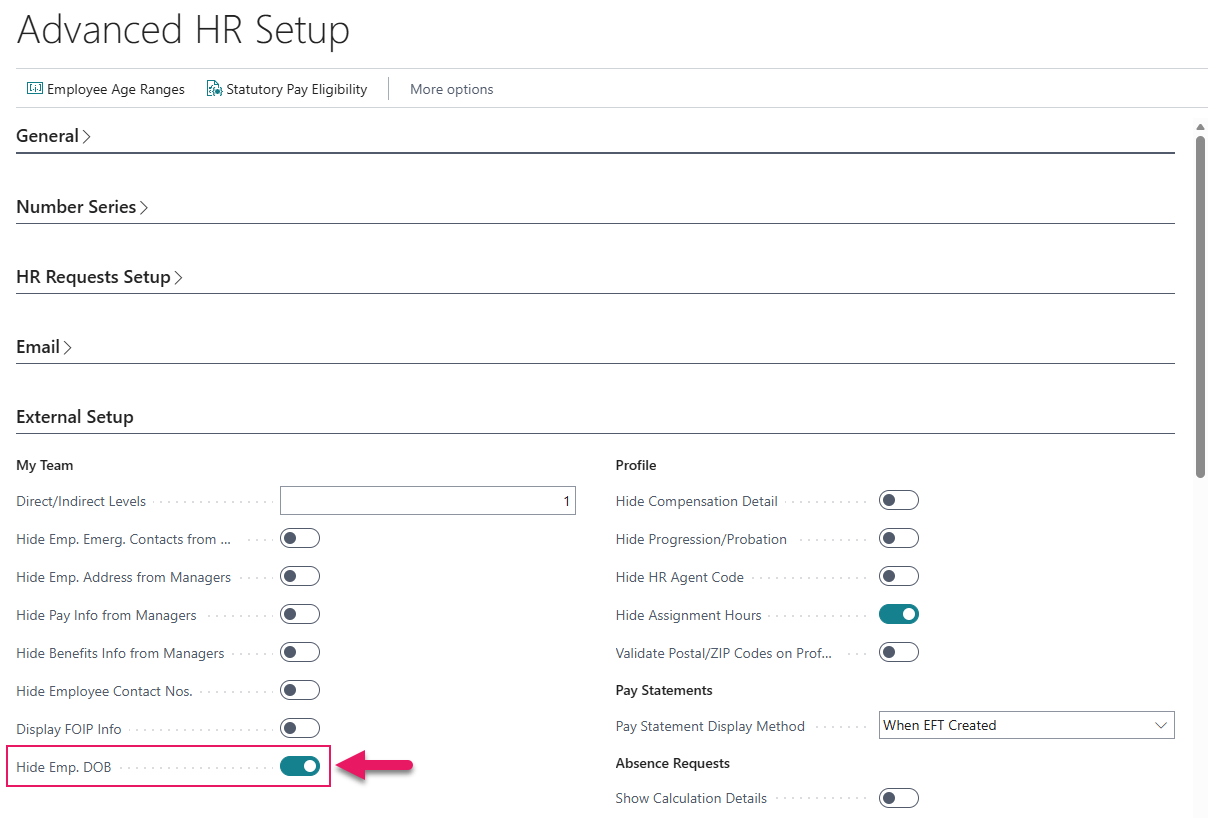
When this toggle is turned on, the employee date of birth field is hidden from managers on the Employee Profile page in mySparkrock.
Tip
Tip:
Changes to the Advanced HR Setup page require you to sign out of mySparkrock, and then sign back in before the changes take effect.
The toggle is turned off by default. When the toggle is turned off, mySparkrock behaves the same as previous releases.
Note
Note:
The mySparkrock user interface components that use this configuration will be available in a future mySparkrock release.
To learn more about advanced HR setup, go to Set up advanced HR setup.
Rehire HR request TD1 Claimed Credits initialization
When Process All Steps is selected on a rehire HR request, Sparkrock Impact now automatically creates Federal and Provincial TD1 Claimed Credits records in Federal /Province WH List, effective from the rehire date. The new records are initialized using the same default values that are applied when a new hire HR request is processed. Records from the employee's prior employment period are not deleted or modified.
Payroll Administration
TD1 Claimed Credits withholding defaults on rehire
When a rehire HR request is processed, the next payroll run uses correct new-hire TD1 Claimed Credits withholding defaults rather than stale values from the employee's prior employment period.
Problems that are resolved in this update
The following problems are resolved in this update.
Finance and Procurement
| Description | |
|---|---|
| When a purchase requisition includes comment lines, Sparkrock Impact does not update the purchase requisition status to Completed after all non-comment lines have been invoiced. As a result, the purchase requisition status remains Approved instead of Completed. |
Scheduling
| Description | |
|---|---|
| When the Send Approval Requests job queue is configured to run as a user who is also listed as an approver in the approval group, time entry approval batches are automatically approved without going through the pending approval stage. |
Related information
New for Sparkrock Impact
Finance and Procurement updates
HR Management updates
Scheduling updates
Version 28.1 for Sparkrock Impact 2026 release wave 1 release notes
Feedback
To send feedback about this page, select the following link: