
Update 28.1.2639.913 Published September 25, 2026
Periodically, Sparkrock may publish updates between major releases. All updates are cumulative.
Highlights
The following sections highlight the major accomplishments in this update.
Finance and Procurement
Financial Analysis
HR Management
New features and changes
Update 28.1.2639.913 for Sparkrock Impact 2026 release wave 1 introduces the following new features and changes.
Finance and Procurement
Set a default vendor template for mySparkrock vendor creation
Administrators can now set a default vendor template so that vendor creation succeeds when a user in mySparkrock creates a vendor from a company contact. Previously, this creation succeeded only when a company held exactly one vendor template that matched the contact, so a company holding none or several matching templates failed every attempt.
Note
Note:
mySparkrock updates that use this change will be available in a future mySparkrock release.
Default vendor template setting
On the Purchases & Payables Setup page, on the Finance Requests FastTab, in the Purchase and Payment Requests section, a new Default Vendor Template field specifies the vendor template that Sparkrock Impact applies when a vendor is created from a company contact.
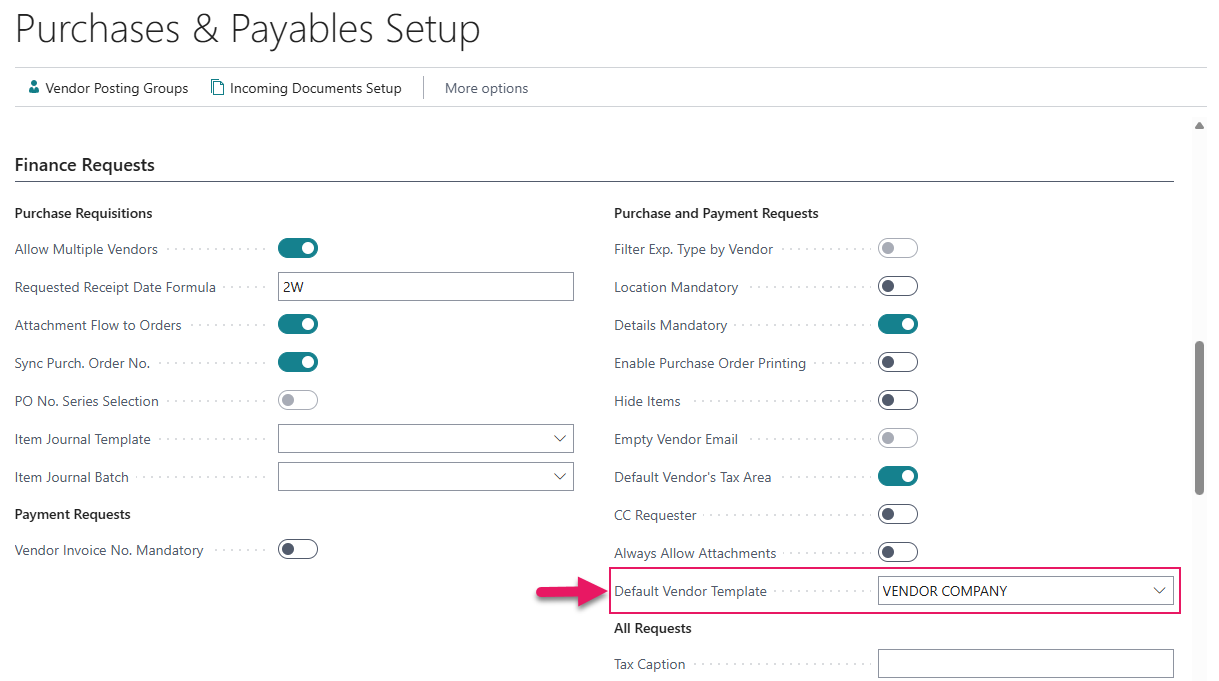
The lookup on this field offers only vendor templates whose Contact Type is Company.
Leave the field blank to keep the current behavior, where Sparkrock Impact applies a vendor template only when a company holds exactly one matching template.
Vendor creation through mySparkrock
When the Default Vendor Template field holds a value and a user in mySparkrock creates a vendor from a company contact, Sparkrock Impact applies that template during vendor creation, regardless of how many vendor templates the company holds. If the field is blank, Sparkrock Impact continues to apply a vendor template only when a company holds exactly one matching template, and returns an error when none or several match.
Learn more
- Set up a default vendor template for mySparkrock vendor creation
PD-8989, PD-8990, PD-8991
HR Management
Trakstar integration improvements
The following sections describe how Sparkrock Impact now recognizes an internal transfer during a sync of hires, and where a user can enter a job requisition's description.
Internal candidates hired through Trakstar Hire come in as transfers
Previously, when a user selected the Sync Hires action, Sparkrock Impact treated every hired Trakstar Hire candidate as a new hire, even an existing employee moving into a new role. An administrator had to set up the transfer by hand afterward, and until then the employee's history reflected a new hire rather than a transfer.
When a user selects the Sync Hires action now, Sparkrock Impact recognizes an internal transfer and creates a transfer HR request for the existing employee instead of a new hire request.
Internal transfer stage setup
On the Trakstar Setup page, on the General FastTab, a new Internal Transfer Stage Name field specifies the Trakstar Hire hiring-workflow stage that identifies an internal transfer candidate.
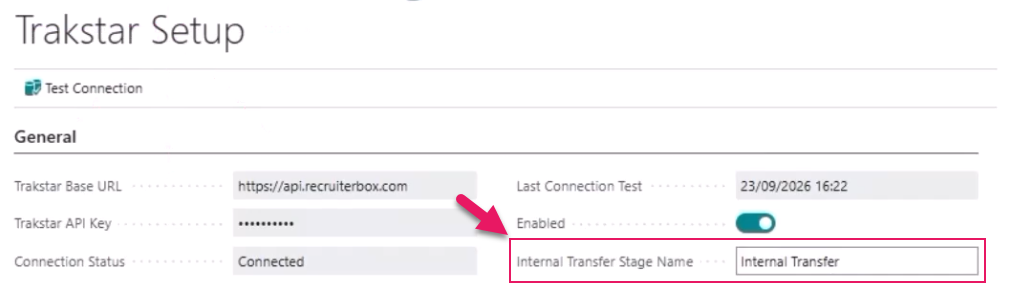
Sparkrock Impact defaults the value of this field to Internal Transfer, so behavior is unchanged for a board whose stage already uses that name.
Leave the field blank to keep the previous behavior, where every hired candidate comes through as a new hire.
Sync Hires behavior for internal transfers
When a hired candidate's Trakstar stage matches the configured Internal Transfer Stage Name and a user selects the Sync Hires action, Sparkrock Impact now creates a transfer HR request for the candidate instead of a new hire request.
To find the matching employee, Sparkrock Impact checks the candidate's email in Trakstar against the employee's E-Mail and Company E-Mail fields in Sparkrock Impact, and falls back to matching on name when no email matches. When Sparkrock Impact cannot match a candidate with confidence, Sparkrock Impact does not create an HR request. Sparkrock Impact instead counts the candidate as needing manual follow-up in its summary message.
On a transfer HR request, Sparkrock Impact populates data based on the matched employee, including their current assignment, the effective date from Trakstar Hire, and the position the employee transferred onto based on the job requisition the candidate applied to.
Job requisition HR request description
This release adds a Description field to the HR Request and HR Request-Job Requisition pages.
HR Request page
A user who has the HR Department Manager role can now enter a Description on the HR Request page of a job requisition HR request and publish the requisition to Trakstar Hire.
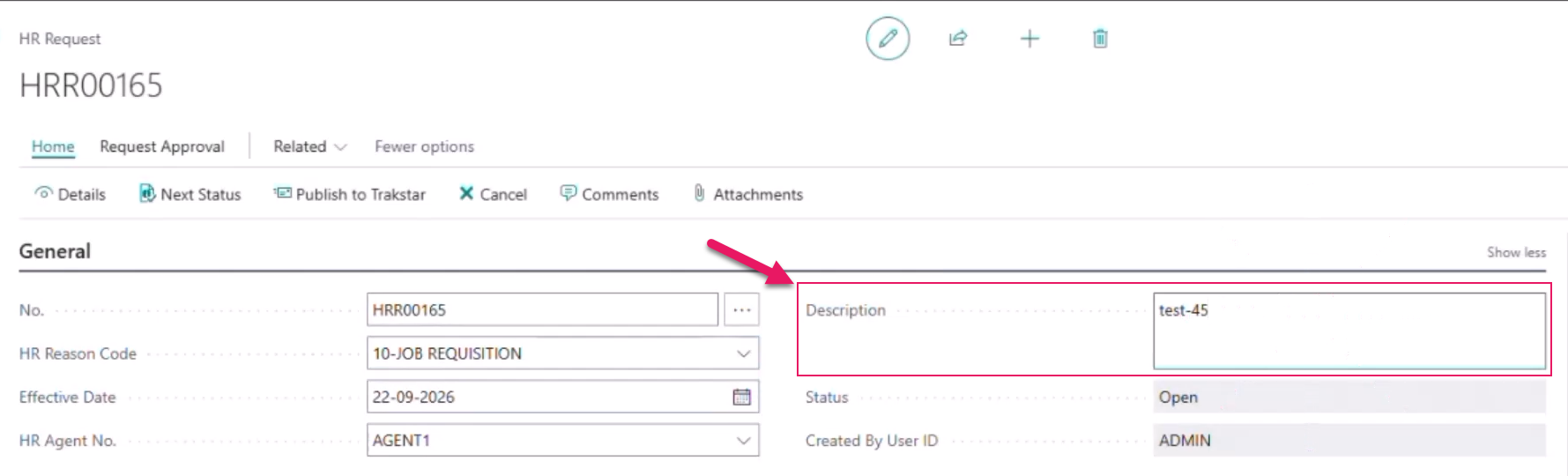
Previously, the Description field was not available for users who have the HR Department Manager role. When these users selected the Publish to Trakstar action, Trakstar refused every job requisition because there was no Description entered.
HR Request-Job Requisition page
A new Description field is also available on the HR Request-Job Requisition page, alongside the other job posting fields.
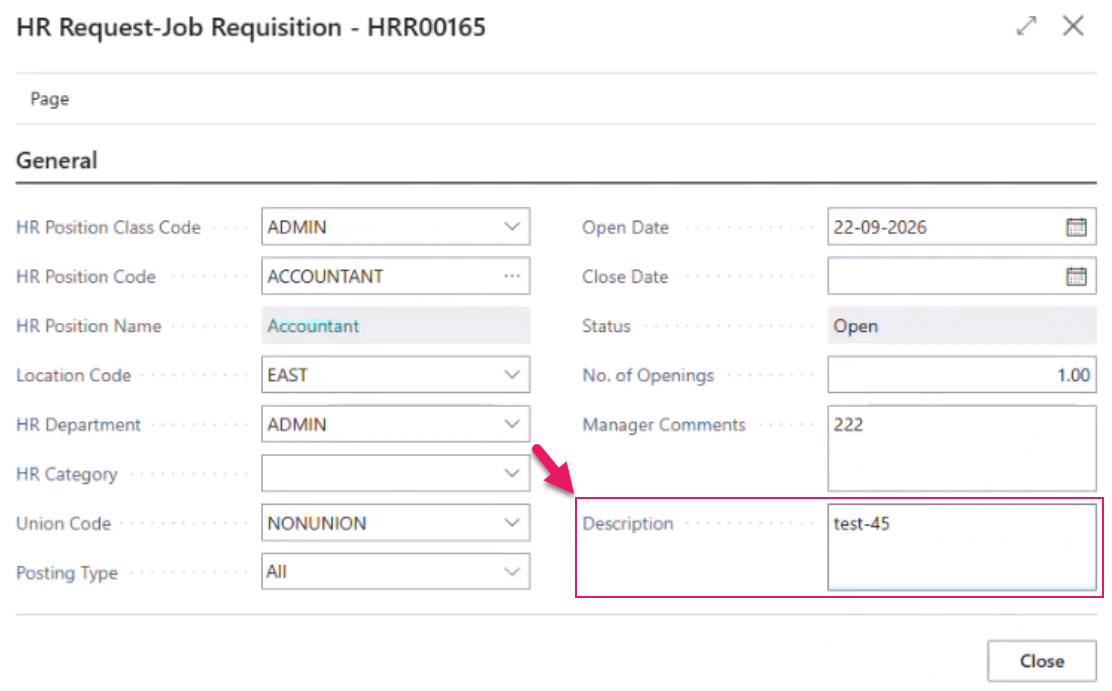
A Description entered here also appears on the HR Request page, so both pages always show the same description.
Learn more
- Set up a Trakstar ATS integration
- Trakstar ATS integration
- Job requisitions
PD-8701, PD-8792, PD-8793, PD-8794, PD-8795, PD-8947, PD-8981, PD-9005
Problems that are resolved in this update
The following problems are resolved in this update.
Financial Analysis
| Description | |
|---|---|
| The Sparkrock Impact API that shares financial analysis drill-down data with mySparkrock does not correctly apply a user's dimension security filter when the data set also filters on that dimension. To resolve this problem, the Sparkrock Impact API now correctly applies the user's dimension security filter for financial analysis drill-down, and now displays an error instead of returning unfiltered data if the security filter cannot be applied. |
|
| The Sparkrock Impact API that shares financial analysis data with mySparkrock takes an excessive time to respond when a user performs a financial analysis in mySparkrock. To resolve this problem, the Sparkrock Impact API now responds more efficiently. Also, the Sparkrock Impact API now supports filtering by an individual row. |
Related information
New for Sparkrock Impact
Finance and Procurement updates
Financial Analysis updates
HR Management updates
Version 28.1 for Sparkrock Impact 2026 release wave 1 release notes
Feedback
To send feedback about this page, select the following link: