
Sparkrock Ed HRP version 5.2.2606.0 release notes
Published: February 6, 2026
This article provides an overview of the new and updated features, resolved problems, and general information about Ed HRP version 5.2.2606.0. All Ed HRP releases are cumulative.
Video
Highlights
The following list highlights the major accomplishments in this release.
New features and changes
Version 5.2.2606.0 introduces new features and enhancements to existing functionality.
Manitoba payroll calculation updates
This release updates Manitoba (MB) payroll calculations to ensure provincial tax withholding and Teachers’ Retirement Allowances Fund (TRAF) pension deductions are calculated correctly according to Manitoba and Canada Revenue Agency (CRA) rules. All changes apply only when the Province is set to Manitoba on the Site Configuration page. Payroll calculations for all other provinces remain unchanged.
These updates help organizations maintain statutory compliance, prevent incorrect deductions, and reduce the need for retroactive payroll corrections.
Manitoba provincial tax withholding updates
Manitoba provincial income tax withholding now reflects Manitoba-specific rules, which differ from federal tax calculations.
Key updates include:
Manitoba three-bracket tax structure: Manitoba provincial income tax is calculated using three marginal tax brackets for tax year 2026:
$0 to $47,000: 10.8%
$47,000.01 to $100,000: 12.75%
Over $100,000: 17.40%
Income is taxed progressively as earnings move through each bracket. Income up to $47,000 is taxed at 10.8%, income between $47,000 and $100,000 is taxed at 12.75%, and income above $100,000 is taxed at 17.40%.
Basic Personal Amount (BPA) phase-out enforcement: Manitoba’s BPA is applied using Manitoba-specific rules and values for tax year 2026. The Manitoba BPA amount of $15,780 is applied when an employee’s annual taxable income is below $400,000. When annual taxable income exceeds $400,000, the Manitoba BPA is not applied and is calculated as 0.00.
For example, employees with annual taxable income of $120,000 or $399,999 receive the full Manitoba BPA, while employees with annual taxable income above $400,000 do not receive a BPA.
TRAF pension deduction updates for Manitoba teaching staff
This release updates TRAF pension deduction calculations to align with official Manitoba TRAF employer guidance for both permanent and substitute or part-time teaching staff.
TRAF deductions are calculated using annual pensionable earnings, with different allocation logic depending on employment type. The calculated annual TRAF amount is converted to a daily rate using total working days and then applied to each pay period based on days worked.
Permanent teachers
For permanent Manitoba teachers, TRAF deductions are calculated using Yearly Maximum Pensionable Earnings (YMPE) split rates. Earnings up to the YMPE are calculated at 8.8%, and earnings above the YMPE are calculated at 10.4%. The annual TRAF amount is divided by the total number of working days in the year to determine a daily rate, which is then multiplied by the number of working days in the pay period.
For example, for a permanent teacher with annual earnings above the YMPE, the annual TRAF amount is calculated using both rates, converted to a daily rate based on the board’s working-day calendar, and allocated proportionally to each pay period. This approach ensures consistent TRAF deductions regardless of pay frequency.
Substitute and part-time teachers
For substitute and part-time Manitoba teachers, TRAF deductions are calculated using annualized compensation rather than a full-time-equivalent (FTE) reduced salary. The annualized amount is used to calculate TRAF, and the resulting annual amount is converted to a daily rate using total working days. The daily rate is then multiplied by the service days worked in the pay period, with appropriate FTE adjustments applied.
For example, when a part-time teacher works a partial service day, TRAF is calculated using the annualized earnings amount and allocated only for the service days worked in the period.
Manitoba monthly remittance generation
This release introduces automated monthly remittance generation for Manitoba statutory deductions, including:
Teachers’ Retirement Allowances Fund (TRAF)
Frontier Pension Plan (FPP)
Health and Post-Secondary Education Tax Levy (HE Levy)
Monthly remittance records are generated automatically after payroll completion, with correct aggregation, due date calculation, audit logging, and error handling.
Payroll processors can also manually generate monthly remittances by using the new Monthly Remittance report when required.
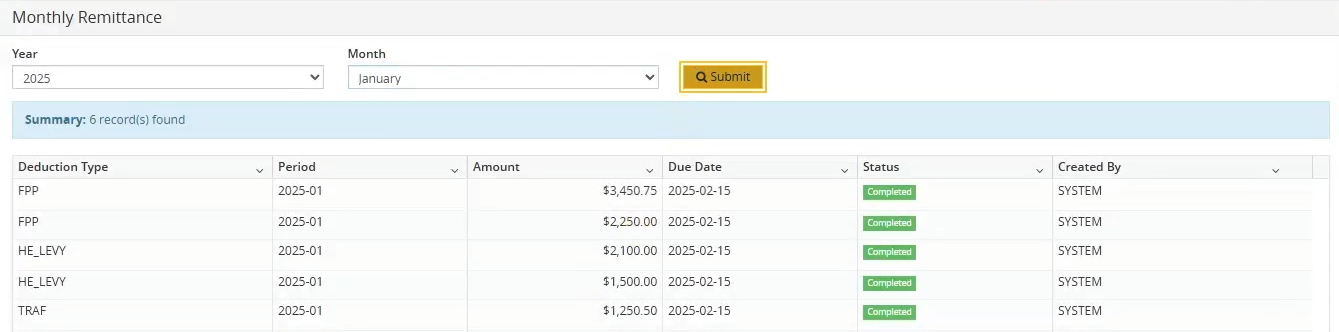
To learn more about the new Monthly Remittance report, go to Monthly Remittance.
Audit logging improvements
This release expands audit tracking for Manitoba statutory pension-related configuration and assignment changes to improve traceability and compliance.
Audit entries are now recorded when a pension Code value of TRAF, FPP, or HE Levy is added or updated from the following pages:
Miscellaneous Codes Maintenance page: When Manitoba pension codes are created or updated, the changes are recorded in board-level audit logs.
Board Pension Deductions page: When Manitoba pension deductions are added or changed at the board level, the changes are recorded in board-level audit logs.
Employee Pension Deductions page: When Manitoba pension deductions are added or modified for individual employees, the changes are recorded in employee-level audit logs.
These updates ensure that Manitoba pension-related changes are consistently auditable at the board and employee levels.
Problems that are resolved in this update
The following problems are resolved in this release.
| Description | |
|---|---|
| On the Statement Of Earnings And Deductions page, in the Earning section, earnings for Teacher Teaching on Call (TTOC) employees display incorrect Unit Type values. TTOC earnings that are calculated based on days worked are shown with a Unit Type of Hours instead of Days, and in-lieu-of-benefits earnings are shown with a Unit Type of Fixed, instead of Hours. |
|
| The Sparkrock Ed HRP version number overlaps the Left menu tabs instead of fitting cleanly beneath the company name and product logo. |
|
| When you try to edit a timesheet earning code for a weekend date, Sparkrock Ed HRP displays an error message even when the Allow Timesheets on Non-Working Days setting is selected. |
|
| On the Employee Spotlight page, in the Employee Information section on the Emergency Contacts tab, users are unable to save changes unless an email address is entered. The Save button remains disabled even though the Email field is optional. |
|
| On the Modify Position page, the Entitlement FTE field appears twice. |
|
| On the Employee Spotlight page, in the Employee Re-Hire section, removing the Re-Hire Date and saving the record does not clear the date. |
|
| On the Benefit Coverage – Modify page, Sparkrock Ed HRP displays an error when 0 is entered in the Minimum Amount field, even though 0 is an allowable value. |
|
| On the Modify Position page, on the Absence & Contracts tab, when a previously entered Increment Date is removed, Sparkrock Ed HRP displays a validation error and prevents the record from being saved with a blank value, even though the Increment Date field is optional. |
|
| On the Modify Position page, on the Absence & Contracts tab, when a user enters too many digits after the decimal point in the Credit Loss/Day field, Sparkrock Ed HRP displays a validation error message that contains a spelling error. |
Feedback
To send feedback about this page, select the following link: