
Sparkrock Impact user licensing
Sparkrock Impact offers the following user license types:
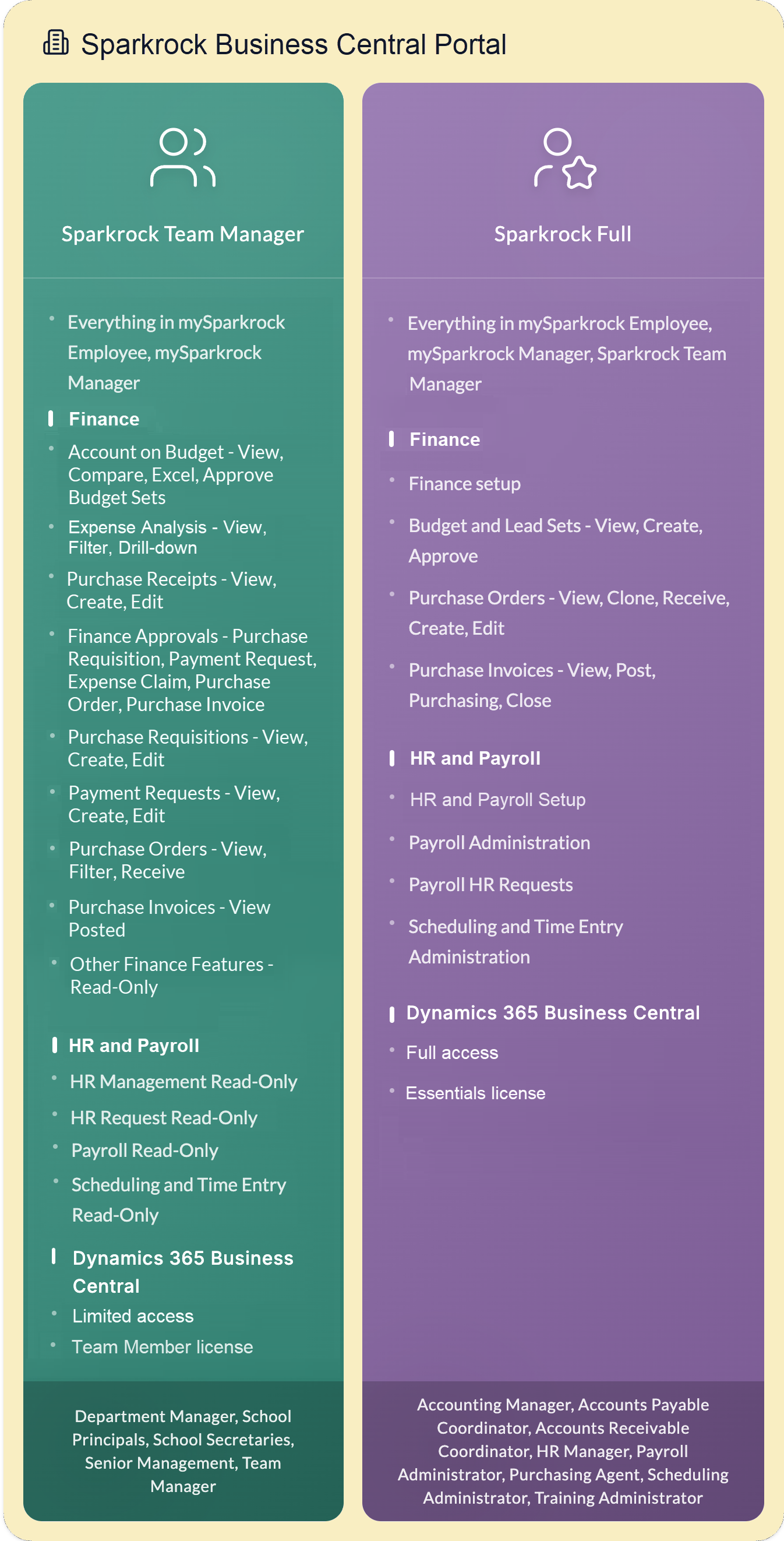
Sparkrock Full
Sparkrock Team Manager
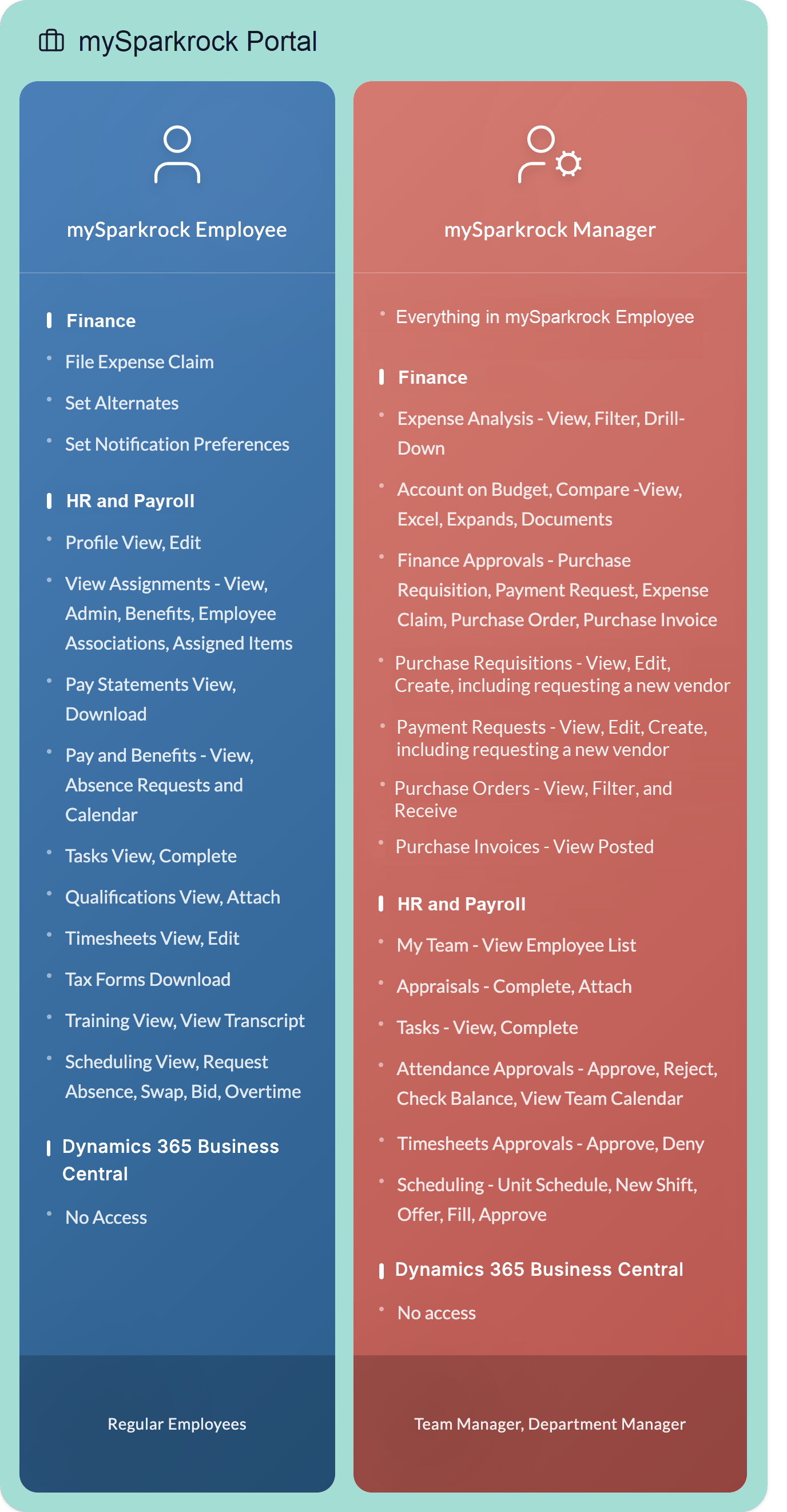
mySparkrock Manager
mySparkrock Employee
Licenses are assigned on a named-user basis. Each individual in an organization must have their own user license. Only one license is required per user.
User licenses cannot be shared between individuals. However, a licensed user can access Sparkrock Impact from multiple devices.
mySparkrock portal and Sparkrock Business Central licensing
Depending on the user license type, users can access Sparkrock Impact, mySparkrock, or both. Access to both applications does not require more than one named-user license per individual.
Sparkrock Full
A Sparkrock Full license is intended for users who require full access to their functional areas and the complete set of capabilities in Sparkrock Impact and mySparkrock. Each Sparkrock Impact subscription requires having Sparkrock Full licenses.
Key Features
A Sparkrock Full license provides:
- Access to all capabilities that are available to mySparkrock Employee, mySparkrock Manager, and Sparkrock Team Manager users.
- Full create, edit, and delete permissions across all assigned product and feature areas in Sparkrock Impact.
Typical Roles
Users that are assigned a Sparkrock Full license typically perform one or more of the following roles:
- Accounting Manager
- Accounts Payable Coordinator
- Accounts Receivable Coordinator
- HR Manager
- Payroll Administrator
- Purchasing Agent
- Scheduling Administrator
A Sparkrock Full user requires a Microsoft Dynamics 365 Business Central Essential license.
Security and permissions for Sparkrock Full users
Through user security and permission configurations, a Sparkrock Full user can be granted access only to the areas of Sparkrock Impact that are required for their role.
A Sparkrock Full user can be granted full access to all available product and feature areas, including create, edit, and delete capabilities.
Security and permission configurations are defined based on organizational requirements and may vary between organizations. The appropriate configuration for Sparkrock Full users is established during the Sparkrock onboarding process.
Sparkrock Team Manager
A Sparkrock Team Manager license is intended for users who work in a managerial or supervisory capacity and do not require Sparkrock Full access.
Key Features
A Sparkrock Team Manager license provides:
- Access to all capabilities available to mySparkrock Employee and mySparkrock Manager users.
- The capability to perform the following tasks in Sparkrock Impact:
- Approve budget sets.
- Approve journals.
- Approve purchase credit memos.
- Approve purchase invoices.
- Conduct financial reporting and analytics.
- Create, approve, and view HR requests.
- Create, approve, and view payment requests, including requesting a new vendor.
- Create, approve, and view purchase requisitions, including requesting a new vendor.
- View and approve expense claims.
- View, approve, and receive purchase orders.
- View posted purchase invoices and credit memos.
- The capability to perform the following tasks in mySparkrock:
- Approve absences and vacation requests.
- Create and approve timesheets.
- Manage and approve employee schedules.
- View and complete manager tasks.
Typical roles
Users assigned a Sparkrock Team Manager license typically perform one or more of the following roles:
- Department Manager
- School Principals
- School Secretaries
- Senior Management
- Team Manager
A Sparkrock Team Manager user requires a Microsoft Dynamics 365 Business Central Team Member license.
Security and permissions for Sparkrock Team Manager users
A Sparkrock Team Manager user has full access to mySparkrock, as defined by their user security and permission configurations.
In Sparkrock Impact, access is limited and typically includes read-only capabilities along with Department Manager access. Department Manager access applies to the Finance and Procurement and HR Management extensions and supports approval, review, and oversight activities rather than full transaction maintenance.
The appropriate configuration for Sparkrock Team Manager users is established during the Sparkrock onboarding process.
mySparkrock Manager
A mySparkrock Manager User is intended for users in an organization who only require access to mySparkrock and act in a managerial capacity.
Key Features
A mySparkrock Manager license provides:
- Access to all capabilities available to mySparkrock Employee users.
- The capability to perform the following tasks:
- Conduct financial analysis.
- Create, approve, and view expense claims.
- Create, approve, and view payment requests, including requesting a new vendor.
- Create, approve, and view purchase requisitions, including requesting a new vendor.
- Approve purchase invoices.
- View posted purchase invoices and credit memos.
- View, approve, and receive purchase orders.
- Approve absences and vacation requests.
- Approve timesheets.
- Manage and approve employee schedules.
- View and complete manager tasks.
Typical roles
Users that are assigned a mySparkrock Manager license typically perform one or more of the following roles:
- Department Manager
- Team Manager
Security and permissions for mySparkrock Manager users
A mySparkrock Manager user has access to mySparkrock, as defined by their user security and permission configurations.
mySparkrock Manager users cannot access Sparkrock Impact.
The appropriate configuration for mySparkrock Manager users is established during the Sparkrock onboarding process.
mySparkrock Employee
A mySparkrock Employee license is intended for users who only require access to mySparkrock and do not have any approval capabilities. Often, a mySparkrock Employee user represents the largest group of users in an organization.
Key Features
Typically, a mySparkrock Employee user requires access to view their personal data, such as the following:
- Profile information
- Pay statements
- Expense claims
- Qualifications
- Schedule
- Tasks
- Tax forms
- Vacation and absences
A mySparkrock Employee user may also require access to enter data, such as for the following reasons:
- Bid on shifts.
- Edit their profile.
- Fill out a timesheet.
- Submit an expense claim.
- Submit vacation and absence requests.
Security and permissions for mySparkrock Employee users
A mySparkrock Employee user has access to mySparkrock, as defined by their user security and permission configurations.
mySparkrock Employee users cannot access Sparkrock Impact.
The appropriate configuration for mySparkrock Employee users is established during the Sparkrock onboarding process.
Finance and Procurement users
The following table describes the features and functionality that are available for the different license types for Finance and Procurement users.
| Features and Functionality | Sparkrock Full | Sparkrock Team Manager | mySparkrock Manager | mySparkrock Employee |
|---|---|---|---|---|
| Access to all areas of Finance and Procurement in Sparkrock Impact |  |
|||
| Includes read-only access to Finance and Procurement in Sparkrock Impact | |
|
||
| Approve Budget Sets | |
|
||
| Approve Purchase Invoices | |
|
|
|
| Approve Purchase Orders | |
|
|
|
| Create and edit Budgets and Budget Sets | |
|||
| Create and edit Purchase Invoices | |
|||
| Create and edit Purchase Orders and Receiving | |
|||
| Create, edit, and approve Purchase Requisitions | |
|
|
|
| Create, edit, and approve Payment Requests | |
|
|
|
| Create and edit Purchase Receipts | |
|
||
| Edit and complete Purchasing Card Transactional Data | |
|
|
|
| Expense Claims Approval | |
|
|
|
| Expense Claims Submission | |
|
|
|
| Financial Analysis | |
|
|
|
| Split a Purchasing Card Line | |
|
|
|
| Upload Purchasing Card Data | |
|||
| View Purchase Orders and Receiving | |
|
|
|
| View Purchase Invoices | |
|
|
|
| For features and functionality that are not listed here, see the security and permissions sections above. |
HR Management users
The following table describes the features and functionality that are available for the different license types for HR Management users.
| Features and Functionality | Sparkrock Full | Sparkrock Team Manager | mySparkrock Manager | mySparkrock Employee |
|---|---|---|---|---|
| Access to all areas of HR Management in Sparkrock Impact | |
|||
| Includes read-only access to HR Management in Sparkrock Impact | |
|
||
| Appraisals | |
|
|
|
| Attendance Approvals | |
|
|
|
| HR Requests and HR Request Approvals | |
|
||
| My Profile, Attendance and Requests | |
|
|
|
| My Team | |
|
|
|
| Qualifications | |
|
|
|
| Tasks (Manager) | |
|
|
|
| Tasks (Employee) | |
|
|
|
| Training and Registration | |
|
|
|
| For features and functionality that are not listed here, see the security and permission sections above. |
Scheduling and Time Entry users
The following table describes the features and functionality that are available for the different license types for Scheduling and Time Entry users.
| Features and Functionality | Sparkrock Full | Sparkrock Team Manager | mySparkrock Manager | mySparkrock Employee |
|---|---|---|---|---|
| Access to all areas of Scheduling and Time Entry in Sparkrock Impact | |
|||
| Includes read-only access to Scheduling and Time Entry in Sparkrock Impact | |
|
||
| Admin Timesheets in mySparkrock | |
|
|
|
| Confirm Shifts Worked in mySparkrock | |
|
|
|
| My Schedule and Unit Schedule in mySparkrock | |
|
|
|
| Timesheets (Manager) in mySparkrock | |
|
|
|
| Timesheets (Employee) in mySparkrock | |
|
|
|
| Unit and Approve Shifts Worked in mySparkrock | |
|
|
|
| For features and functionality that are not listed here, see the security and permissions sections above. |
Payroll Administration users
The following table describes the features and functionality that are available for the different license types for Payroll Administration users.
| Features and Functionality | Sparkrock Full | Sparkrock Team Manager | mySparkrock Manager | mySparkrock Employee |
|---|---|---|---|---|
| Access to all areas of Payroll Administration in Sparkrock Impact | |
|||
| Includes read-only access to Payroll Administration in Sparkrock Impact | |
|||
| Access to Pay Statements | |
|
|
|
| Access to Payroll Entry HR Requests | |
|
||
| Access to Tax Forms | |
|
|
|
| For features and functionality that are not listed here, see the security and permission sections above. |
Internal administrator licensing
For information about internal administrator licensing, see Administration of Business Central Online.
External Accountant licensing
To access customer environments, your Sparkrock support and implementation representatives use External Accountant licenses. To learn more about External Accountant licenses, see Accountant experiences in Dynamics 365 Business Central.
Related information
Licensing in Dynamics 365 Business Central
Feedback
To send feedback about this page, select the following link: