
SchoolDay version 1.0.2634.2 release notes
Published: August 26, 2026
This article provides an overview of the new and updated features, resolved problems, and general information about version 1.0.2634.2. All SchoolDay releases are cumulative.
Highlights
The following list highlights the major accomplishments in this release.
New features and changes
Version 1.0.2634.2 introduces the following new features and changes.
Expense account type
This release introduces an Account Type of Expense to SchoolDay, alongside the existing Revenue classification. Administrators can now create expense accounts, and then assign them to invoices, so that invoice payments post to the correct expense category.
Creating expense accounts
On the General Ledger Accounts page, the Add GL Account dialog box now includes an Account Type dropdown.
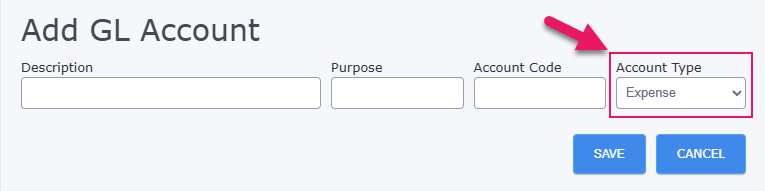
Administrators select Expense to create an expense account, using the same fields that are used for revenue account creation. Account type is set at creation and cannot be changed afterward.
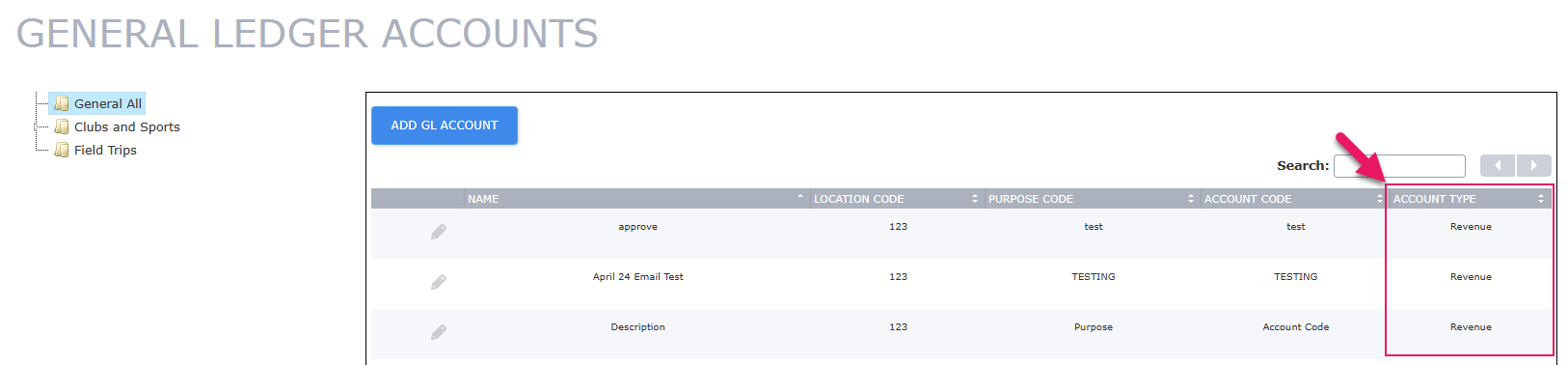
The General Ledger Accounts page now also displays an Account Type column, so all accounts show their classification at a glance.
Account selector behavior
Expense and revenue accounts appear in different places depending on where the payment is posted:
- On invoices, the account selector offers expense accounts only. Revenue accounts are not available on invoices.
- On events, products, fees, and services, the account selector offers revenue accounts only. Expense accounts are not available on these item types.
Learn more
- Add a general ledger account
- View general ledger accounts
SD-1487, SD-1493, SD-1495, SD-1520, SD-1524
Related information
Feedback
To send feedback about this page, select the following link: