
Sparkrock Ed HRP version 5.2.2608.0 release notes
Published: February 20, 2026
This article provides an overview of the new and updated features, resolved problems, and general information about Ed HRP version 5.2.2608.0. All Ed HRP releases are cumulative.
Video
Highlights
The following list highlights the major accomplishments in this release.
New features and changes
Version 5.2.2608.0 introduces new features and enhancements to existing functionality.
Configurable Manitoba BPA phase-out threshold
This release makes the Manitoba Basic Personal Amount (BPA) phase-out threshold configurable rather than hard-coded by introducing a new Manitoba BPA Phase-Out Threshold field on the Federal Tax Data - Modify page when the Province is set to Manitoba on the Site Configuration page.
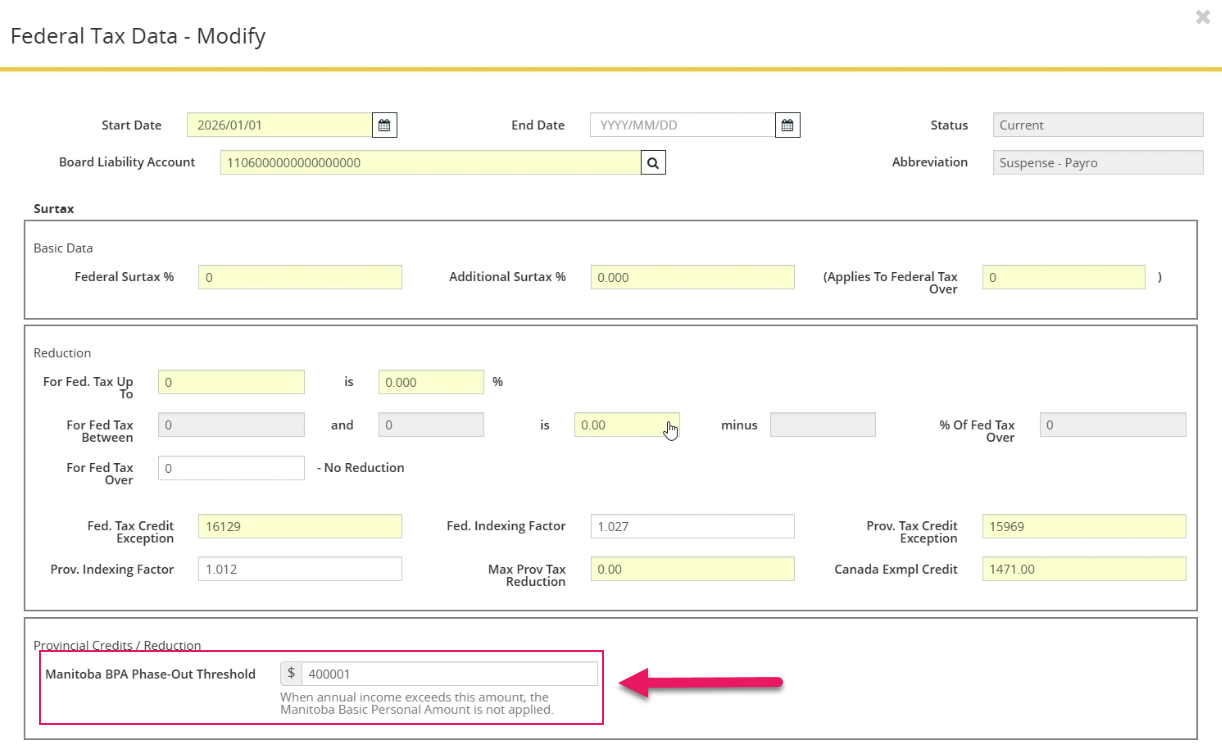
The field is effective-dated with the tax record and defaults to 400,000.
During payroll calculation, the tax engine now references the configured threshold. Manitoba BPA is applied when employee income is less than or equal to the configured value and is set to 0 when income exceeds the threshold.
This update improves flexibility and auditability, and allows payroll administrators to respond to future CRA threshold changes without requiring code updates.
Federal BPA logic and other provincial credits are unchanged.
Parklane enhanced format support
This release adds support for Parklane’s enhanced DAT file population format while preserving existing standard export behavior.
To support this enhancement, this release introduces a Parklane format field on the Parklane Interface page.
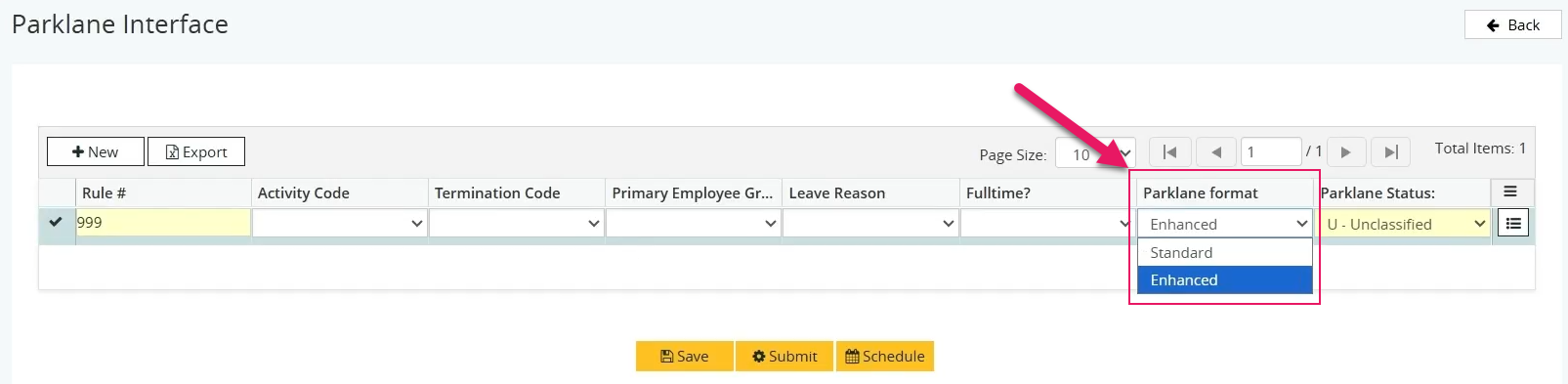
When Parklane format is set to Enhanced, the DAT file populates additional Parklane fields where corresponding data exists in Sparkrock Ed HRP. When set to Standard, field population remains unchanged from previous releases.
The DAT file structure, field order, file length, naming, and delivery mechanism remain unchanged. No migration is required for existing customers.
This update supports Parklane’s enhanced data requirements without impacting customers who continue to use the standard format.
General Ledger (G/L) account search supports values up to 50 characters
This release updates the G/L Account search filter on the G/L Account Code Maintenance page to support values up to 50 characters. Exact and partial match searches now return expected results for longer General Ledger (G/L) accounts, consistent with existing behavior for shorter values.
Previously, G/L accounts longer than 25 characters could be created and saved but were not returned in search results.
2026 T4 printout line 74 on the back of the form
The 2026 T4 printout includes the required CRA URL on Line 74 on the back of the form, in both English and French formats.
No changes to T4 calculation logic or prior tax years are included in this release.
2026 T4 printout box 77 on the back of the form
The back of the 2025 T4 printout now includes the required CRA English text for Box 77:
77 – Workers' compensation benefits repaid to the employer – Enter on line 22900.
No changes were made to T4 calculations or other T4 fields.
STAT_HOL2 vacation accrual correction
This release corrects an issue where statutory holiday pay that is processed with the Entity Type set to STAT_HOL2 did not contribute to vacation accumulation when configured as vacation-assessable.
STAT_HOL2 earnings now increase vacation accumulators (Entity Code = ACCUM) in accordance with existing subject entity maintenance and employee group configuration. No configuration changes are required.
To prevent similar issues, payroll processing now validates that vacation accrual is generated when expected. If a vacation-assessable earning does not produce vacation accumulation, payroll fails with an inline error message and logs the details to the pay run debug file.
These updates ensure vacation accrual is calculated correctly and prevent silent configuration failures going forward.
Problems that are resolved in this update
The following problems are resolved in this release.
| Description | |
|---|---|
| On the Short Term Sick Leave Reduced Pay page, when records that have Use Top Up? set to Y on the Sick Leave Update Parameter tab are submitted, Sparkrock Ed HRP may display an uninformative error message. As a result, records remain pending and cannot be processed because the error message does not indicate what action is required to resolve the problem. |
|
| On the Parklane Interface page, when the grid contains no existing rows, selecting New does not add a row. Despite no row being created and no data being entered, the Save, Submit, and Schedule buttons remain enabled and can be selected. As a result, users can try to generate a report even though no valid data exists in the grid. |
|
| For employees who work weekends, on the Board Employee Absence Entry page, Sparkrock Ed HRP does not perform calculations correctly for absence requests that include weekend dates. The Total Hours value excludes weekend days, and the resulting calculations for Credit Loss in Days and the Override value are incorrect or missing. As a result, payroll and pension calculations for these employees are incorrect. |
|
| On the back page of the T4A Form, the following Canada Revenue Agency (CRA) instruction text is missing from the form: Enter on line 13499/13500: • Box 105, when self-employed. Scholarships, bursaries, fellowships, artists' project grants, and prizes – See line 13499 and line 13500 at canada.ca/fed-tax-information. As a result, the printed T4A slip does not fully reflect the required CRA information. |
|
| On the Add New Employee Wizard page, when address information is entered on the Address & Contact tab, selecting a value in the Country field deletes the previously entered Province and Postal Code values. As a result, you must re-enter this data. |
|
| On the Group Allowances and Grids page, on the Group Allowances tab, the Save button remains disabled even when a record contains valid data. As a result, users cannot save changes to group allowance records. |
|
| On the Employee Spotlight page, on the Compensation tab, the Employee Compensation tab label displays Empployee Compensation instead of Employee Compensation. |
|
| On the Absence Detail page, approved absences are not reflected in accrual balances on the Absence Details tab until payroll import occurs. After an absence is approved, the Requested and Available values do not update to reflect the approved absence amount. As a result, the Available balance continues to display the original accrued amount instead of subtracting the approved absence, and the Requested balance displays zero instead of the approved amount that is expected to remain until a payroll import is processed. These problems may cause confusion and result in employees overusing accruals before a payroll import is completed. |
Feedback
To send feedback about this page, select the following link: