
Update 28.1.2631.778 Published July 31, 2026
Periodically, Sparkrock may publish updates between major releases. All updates are cumulative.
Highlights
The following sections highlight the major accomplishments in this update.
Finance and Procurement
HR Management
Time Entry
New features and changes
Update 28.1.2631.778 for Sparkrock Impact 2026 release wave 1 introduces the following new features and changes.
Finance and Procurement
Self-approval threshold mode
Finance administrators can now control how finance documents are routed for approval. A new Self-Approval Threshold Mode field on the Document Types FastTab of the Finance Approval Setup page controls how approval routing behaves when a document type is configured with Allow Self-Approval set to Always and Approval Level set to Last Level Approves.
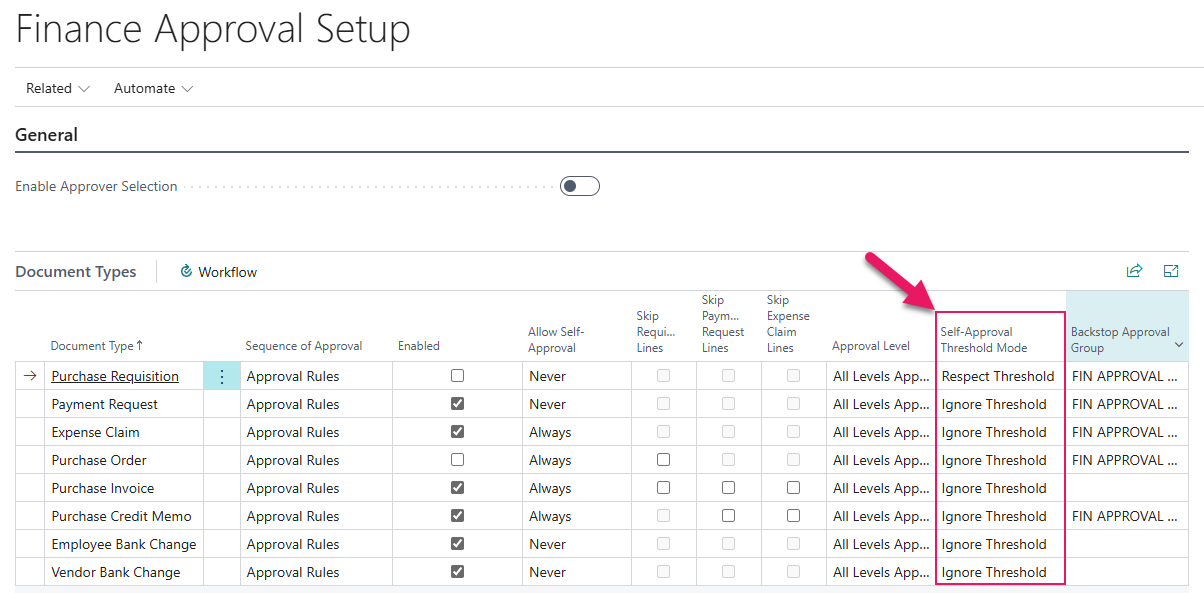
Previously, in this configuration, finance documents were routed to the approval group that the requester belongs to at the highest tier, regardless of the document's amount. A low-value document could route to a senior approval group simply because the requester was a member of that group.
The Self-Approval Threshold Mode field provides the following options:
- Ignore Threshold: Documents route to the requester's highest-tier approval group regardless of the document amount. This option is the default setting.
- Respect Threshold: Approval rules whose amount threshold exceeds the document amount are excluded from routing. The document routes to a lower-tier approval group whose threshold is met, or to the configured Backstop Approval Group if no lower rule applies.
Note
Note:
When Self-Approval Threshold Mode is set to Respect Threshold, a Backstop Approval Group must be configured for that Document Type. Without a Backstop Approval Group, documents whose amounts fall below all configured thresholds produce a workflow error on submission.
Learn more
- Set up finance approval setup
PD-8589, PD-8590
HR Management
Trakstar Hire enhancements
This release introduces the following enhancements to the Trakstar Hire integration:
A new Trakstar Job Type field is available on the Trakstar FastTab of a job requisition HR request.
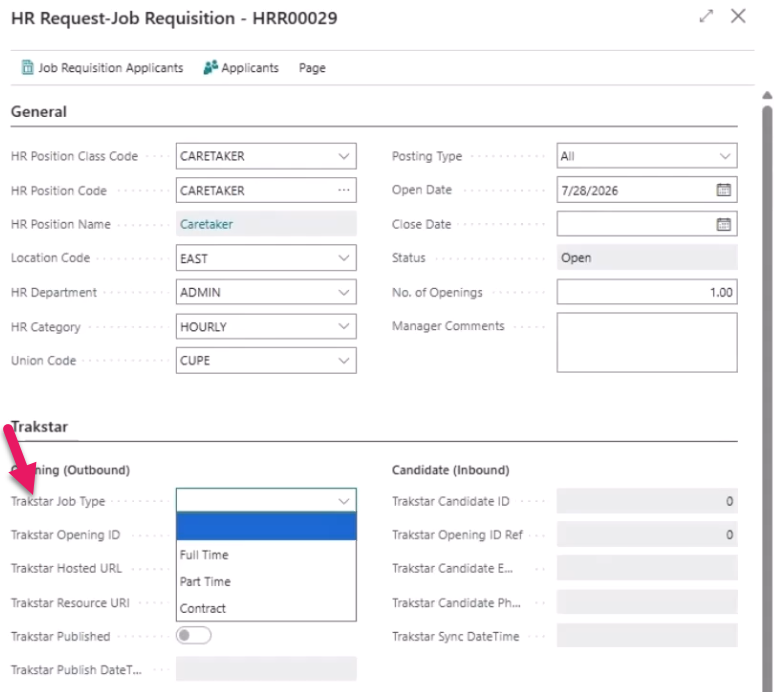
The field provides the following options:
- Full Time: The default option for new job requisitions.
- Part Time
- Contract
Trakstar Job Type is required before publishing to Trakstar Hire. If you try to publish without a value, Sparkrock Impact displays a validation message. When you publish, the job type is sent to Trakstar Hire with the rest of the posting.
Note
Note:
Job requisitions that were created before this release display a blank Trakstar Job Type. You must select a value before publishing those requisitions.The Description field on HR requests now accepts up to 2,048 characters.
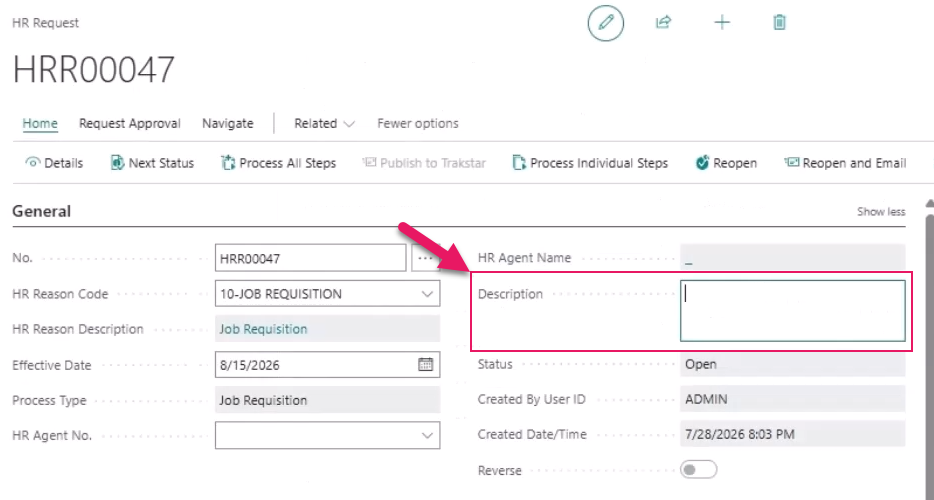
When you publish a job requisition to Trakstar Hire, the full description is included in the posting.
When you run the Sync Hires action, Sparkrock Impact now automatically populates the following fields on new hire HR requests:
- HR Position Code: Resolved by tracing back to the originating job requisition.
- Private Email: Populated from the candidate's email address in Trakstar Hire.
- Phone No.: Populated from the candidate's phone number in Trakstar Hire.
If a field cannot be populated, the field is left blank. This behavior applies to hire records that are synced after this release. Existing hire records are not updated.
HR Department Manager role
Users who are assigned the HR Department Manager role can now access the Trakstar Setup page and use the Publish to Trakstar and Sync Hires actions.
Learn more
- Trakstar ATS integration
PD-8618, PD-8619, PD-8620, PD-8621, PD-8670, PD-8690
Problems that are resolved in this update
The following problems are resolved in this update.
Finance and Procurement
| Description | |
|---|---|
| Due to a Sparkrock Impact API not sharing the correct data with mySparkrock, when you select a vendor on a payment request in mySparkrock, a different vendor may be saved instead of the vendor that was selected. |
|
| Due to a Sparkrock Impact API not sharing the correct data with mySparkrock, the line amount excluding tax does not appear on purchase order receiving lines in mySparkrock. |
Time Entry
| Description | |
|---|---|
| The Sparkrock Impact timesheet entries API that shares data with mySparkrock does not correctly validate user access permissions. |
Related information
New for Sparkrock Impact
Finance and Procurement updates
HR Management updates
Time entry updates
Version 28.1 for Sparkrock Impact 2026 release wave 1 release notes
Feedback
To send feedback about this page, select the following link: