
Update 28.1.2632.790 Published August 7, 2026
Periodically, Sparkrock may publish updates between major releases. All updates are cumulative.
Highlights
The following sections highlight the major accomplishments in this update.
Finance and Procurement
Payroll Administration
New features and changes
Update 28.1.2632.790 for Sparkrock Impact 2026 release wave 1 introduces the following new features and changes.
Finance and Procurement
Retain purchase invoice line data on G/L account change
This release provides the capability for finance users to correct the G/L account on a purchase invoice line without losing user-entered data on the line or that is associated with the line. Previously, changing the No. field on a purchase invoice line where the Type is equal to G/L Account cleared user-entered data. As a result, users were required to re-enter data after each correction.
Setup
To turn on this feature, on the Purchases & Payables Setup page, on the General FastTab, turn on Retain PI Line Field Values.
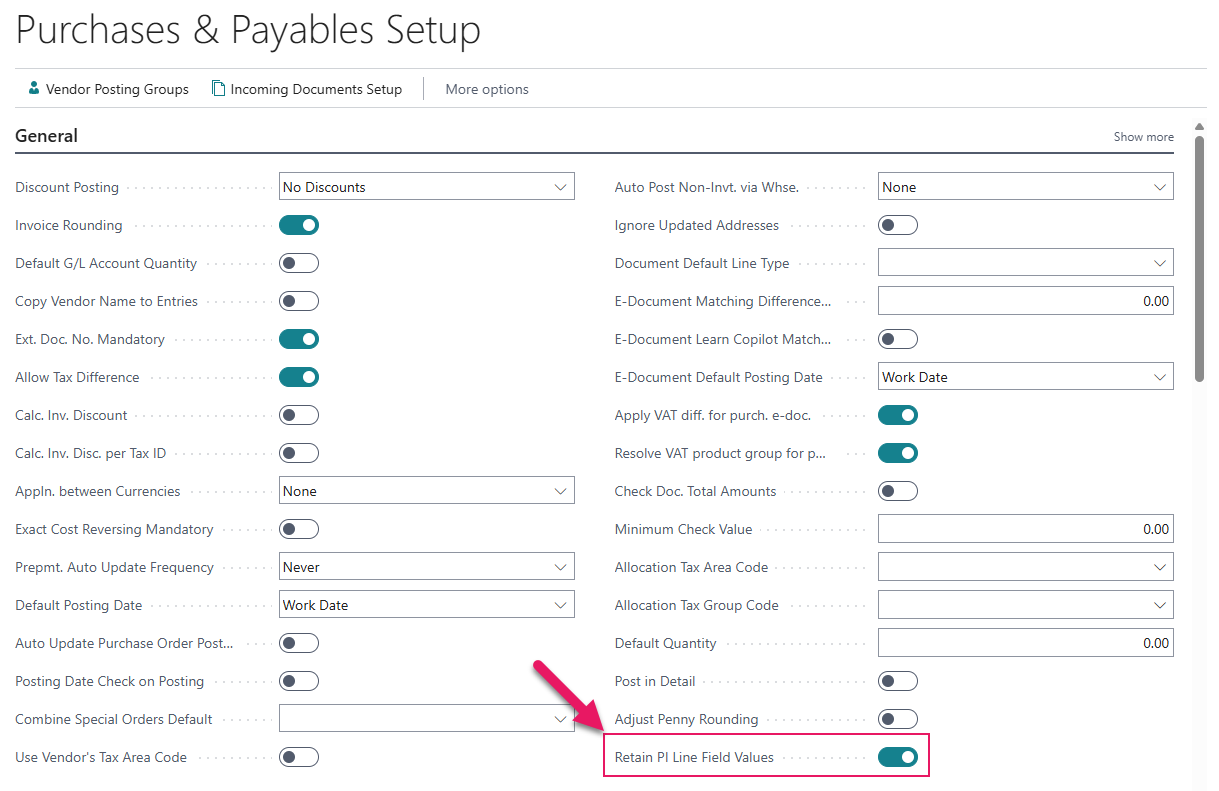
When the toggle is turned off, data on the line or that is associated with the line is cleared by default on a No. field change.
Retained and refreshed data
When Retain PI Line Field Values is turned on and you change the No. field on a G/L account-type purchase invoice line, Sparkrock Impact preserves the following user-entered data:
- Quantity
- Direct unit cost
- Line discount percentage
- Line amount
- Unit of measure
- Tax area code and tax liable
- Dimension values
- File attachments that are associated with the line
- Line comments
The following data is refreshed from the newly selected G/L account and is not retained:
- Description
- Tax group code
- Budget category code
- General business posting group
- General product posting group
- Value added tax business posting group
- Value added tax product posting group
The retention behavior applies to all purchase invoices, including those that are generated from approved expense claims. Purchase orders, purchase credit memos, purchase quotes, blanket purchase orders, and purchase return orders are not affected.
Learn more
- Retain purchase invoice line data on G/L account change
PD-8623, PD-8624
Hide expense type fields in mySparkrock
This release provides finance administrators the capability to simplify the expense submission form in mySparkrock.
Note
Note:
The mySparkrock user interface components that use this configuration will be available in a future mySparkrock release.
Two new toggles are available on the Expense Claims FastTab of the Expense Type Card page:
- Hide Round Trip
- Hide Unit of Measure
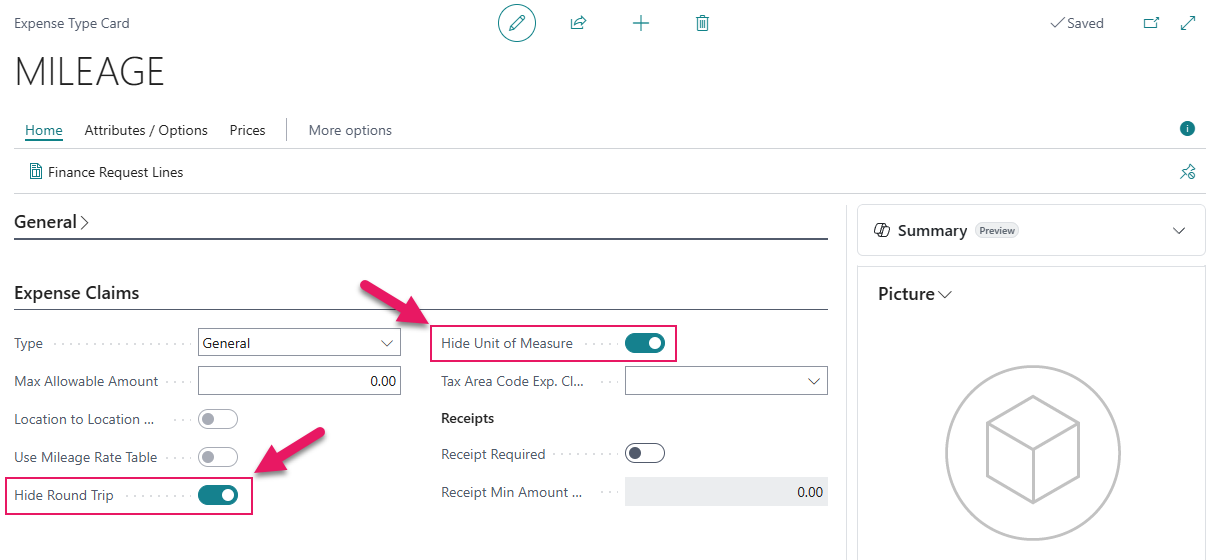
When either toggle is turned on, the corresponding field no longer appears on the mySparkrock expense line form for employees submitting an expense. When either toggle is turned off, the corresponding field appears on the mySparkrock expense line form.
Both toggles default to off, so the expense submission form continues to behave the same as previous releases until a finance administrator turns on either toggle.
Changes take effect immediately for all employees after the expense type record is saved.
Learn more
- Set up expense types and expense type categories
PD-8605, PD-8606
Problems that are resolved in this update
The following problems are resolved in this update.
Finance and Procurement
| Description | |
|---|---|
| On purchase documents, Sparkrock Impact may not apply the Vendor Posting Group security filter correctly. |
|
| When you create a purchase invoice from a received purchase order line but have not yet released the invoice, Sparkrock Impact understates the encumbrance amount by the line amount. As a result, budget checking may not reflect the correct available budget. |
|
| On a purchase order or purchase invoice, when the document status is Approved or Pending Approval, the Details field on lines can be edited instead of remaining read-only. |
Payroll Administration
| Description | |
|---|---|
| On the Mass Emp. Record of Employment page, when you select multiple employees, and then select Refresh ROE Details, Sparkrock Impact only refreshes the ROE details for the first employee in the selection. The remaining selected employees are not refreshed. |
Related information
New for Sparkrock Impact
Finance and Procurement updates
Payroll Administration updates
Version 28.1 for Sparkrock Impact 2026 release wave 1 release notes
Feedback
To send feedback about this page, select the following link: