
Update 28.1.2636.875 Published September 4, 2026
Periodically, Sparkrock may publish updates between major releases. All updates are cumulative.
Highlights
The following sections highlight the major accomplishments in this update.
Finance and Procurement
Financial Analysis
HR Management
New features and changes
Update 28.1.2636.875 for Sparkrock Impact 2026 release wave 1 introduces the following new features and changes.
Finance and Procurement
Sync payroll accounts to Sparkrock EdHRP
This release introduces the capability to designate payroll accounts in Sparkrock Finance and automatically sync them to Sparkrock EdHRP, so that payroll staff no longer need to manually re-enter the same account information in both systems.
Note
Note:
The Sparkrock EdHRP components that use this configuration will be available in a future Sparkrock EdHRP release.
HRP Connector Setup
On the new HRP Connector Setup page, you can specify the connection details that Sparkrock Finance uses to sync payroll accounts to Sparkrock EdHRP.
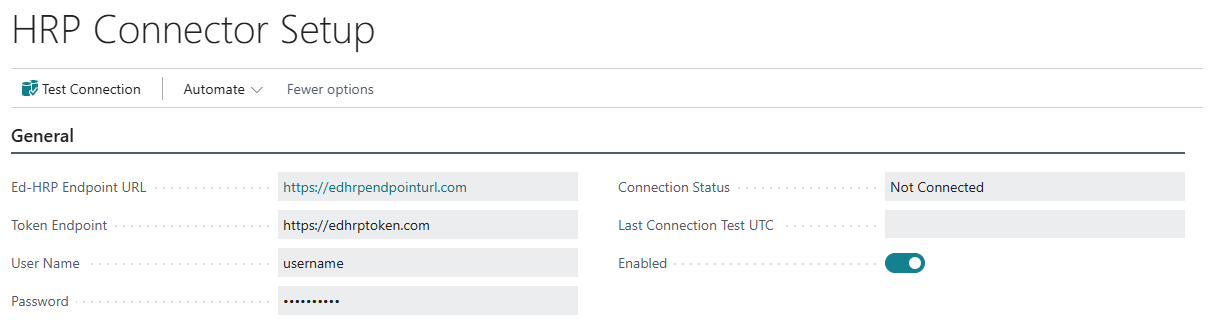
Specify values for Ed-HRP Endpoint URL, Token Endpoint, User Name, and Password, and then select Test Connection to verify the connection. If the connection is successful, Connection Status displays Connected. If the connection is not successful, Connection Status displays Not Connected. Last Connection Test UTC displays the date and time of the most recent connection test.
To sync payroll accounts to Sparkrock EdHRP, select Enabled. Ed-HRP Endpoint URL, Token Endpoint, User Name, and Password must be specified before you can select Enabled. When Enabled is selected, Ed-HRP Endpoint URL, Token Endpoint, User Name, and Password cannot be edited. When Enabled is clear, those fields can be edited.
Ed-HRP Sync Handler job queue entry
When you select Enabled on the HRP Connector Setup page for the first time, Sparkrock Finance creates the Ed-HRP Sync Handler job queue entry, with a Status of Ready.
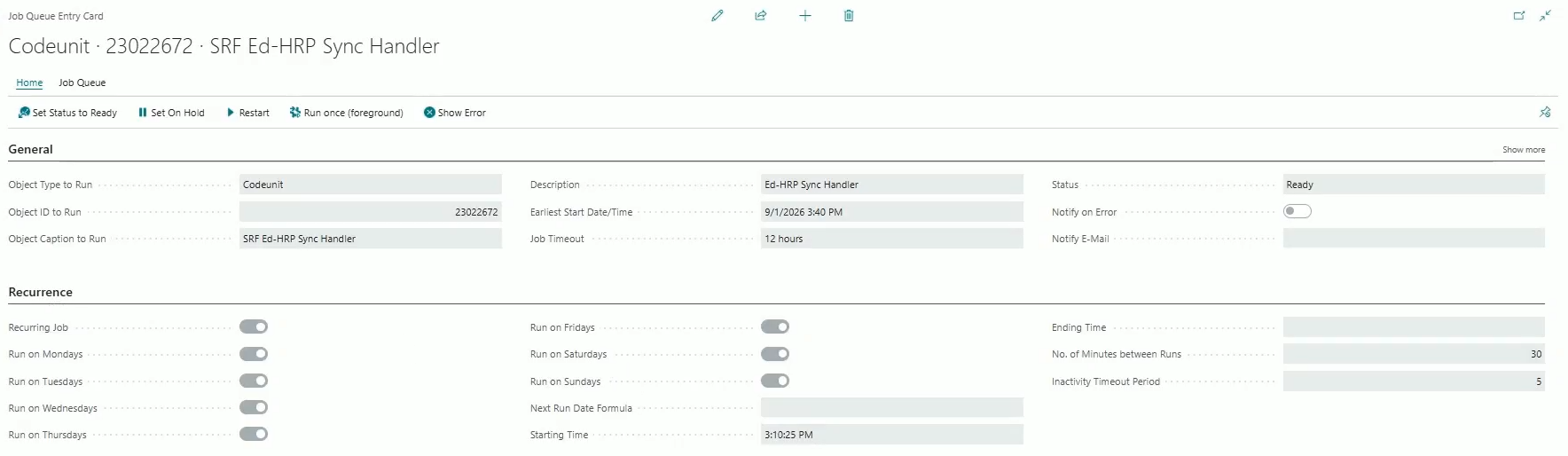
This job queue entry runs every 30 minutes to sync payroll accounts to Sparkrock EdHRP. When you clear Enabled, the Ed-HRP Sync Handler job queue entry Status is set to On Hold. When you select Enabled again, the Ed-HRP Sync Handler job queue entry Status is set back to Ready. You can view and manage the Ed-HRP Sync Handler job queue entry on the standard Business Central Job Queue Entries page.
Payroll account designation on Account Sets and Chart of Accounts
On the Account Sets page, and on the Chart of Accounts page, a new Payroll Account checkbox column lets you specify whether an account set code or GL account is designated for payroll use.
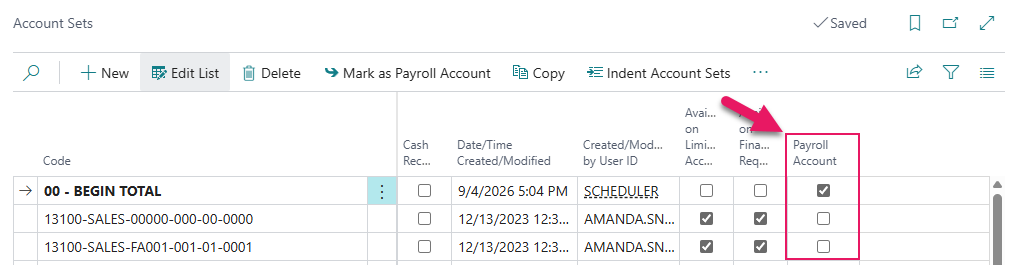
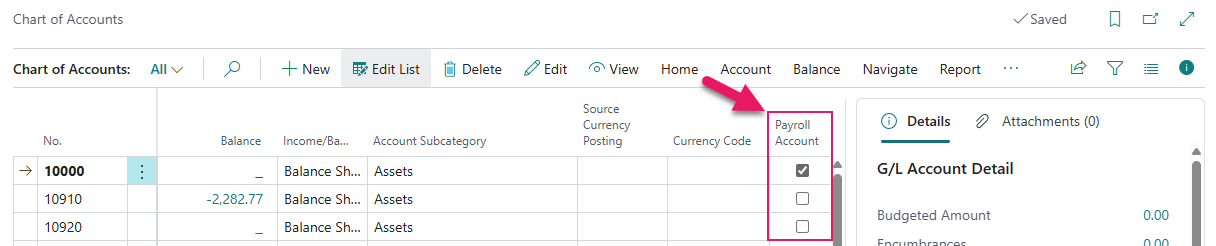
When Payroll Account is selected, the account set code or GL account is designated for payroll use. When Payroll Account is clear, the account set code or GL account is not designated for payroll use. Payroll Account is clear by default for new and existing records.
Automatic payroll account designation
When you specify a GL Account No. on an account set code, Payroll Account on the account set code automatically matches Payroll Account on the linked GL account. When the linked GL account has Payroll Account selected, Payroll Account on the account set code is selected and becomes read-only. When the linked GL account has Payroll Account clear, or when you clear GL Account No., Payroll Account on the account set code is clear and remains editable.
When you select Payroll Account on an existing GL account, Sparkrock Finance also selects Payroll Account on all account set codes that are linked to that GL account. When you clear Payroll Account on a GL account, Payroll Account on linked account set codes is not changed.
Bulk payroll account designation
On the Account Sets and Chart of Accounts pages, you can select one or more rows, and then select the Mark as Payroll Account action to select Payroll Account on all selected records.
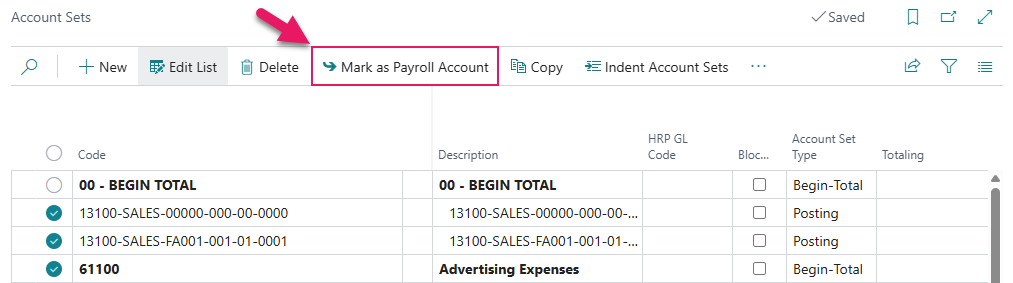
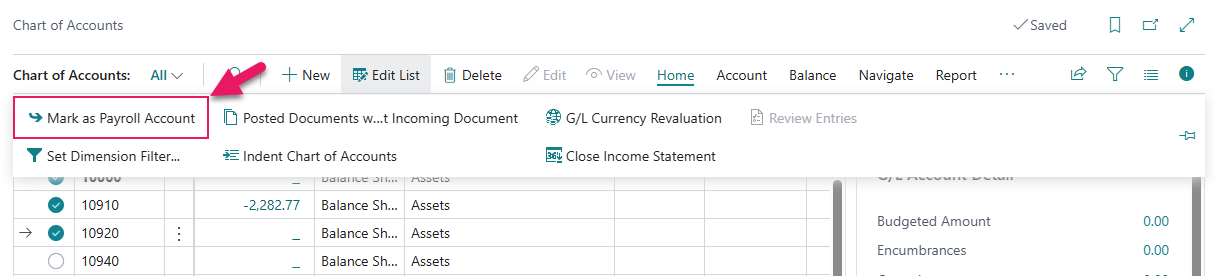
Records that already have Payroll Account selected are skipped. On the Chart of Accounts page, marking a GL account as a payroll account also selects Payroll Account on all account set codes that are linked to that GL account.
Ed-HRP Sync Queue List
On the new Ed-HRP Sync Queue List page, you can view the status of account set codes that are queued to sync to Sparkrock EdHRP.

When you select Payroll Account on an account set code for the first time, or change Blocked or Description on an account set code that has Payroll Account selected, Sparkrock Finance adds an entry to the Ed-HRP Sync Queue List page. Sparkrock Finance attempts to sync the entry to Sparkrock EdHRP within 30 minutes.
Permissions
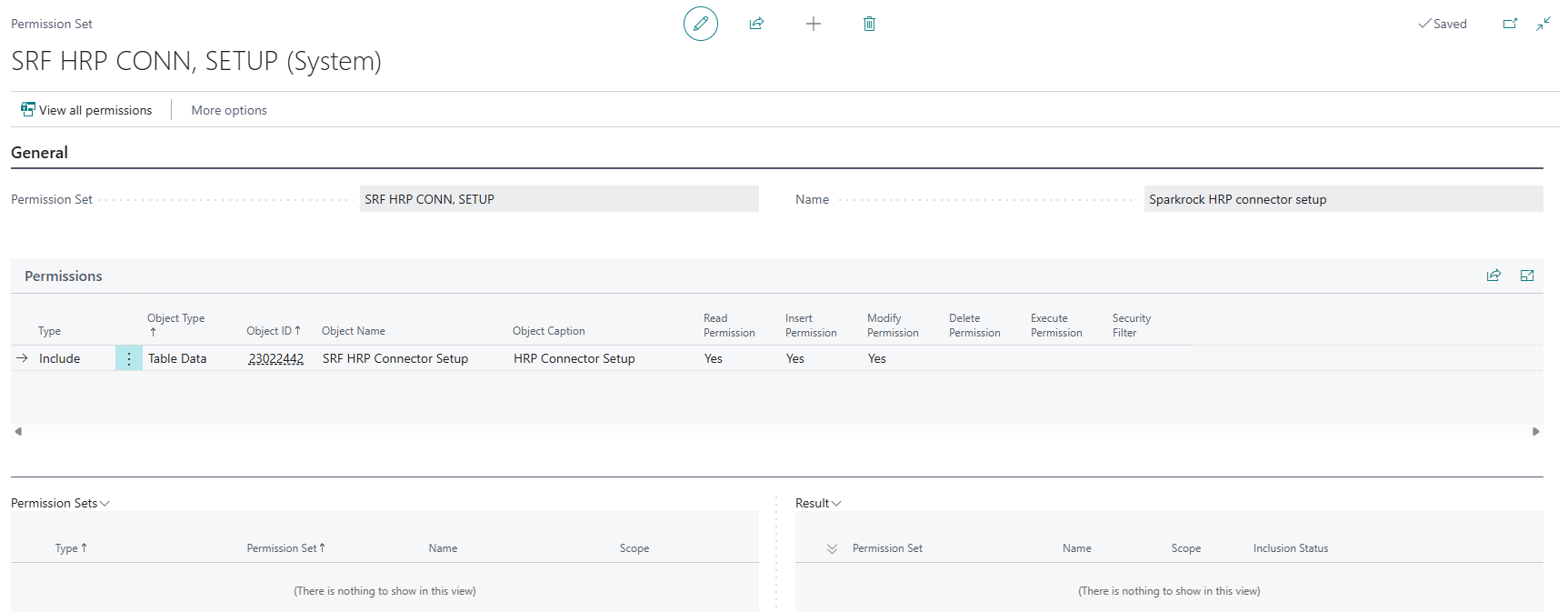
This release introduces a SRF HRP CONN, SETUP permission set that includes read, insert, and modify permission access to the HRP Connector Setup page, for administrators who manage the connection to Sparkrock EdHRP.
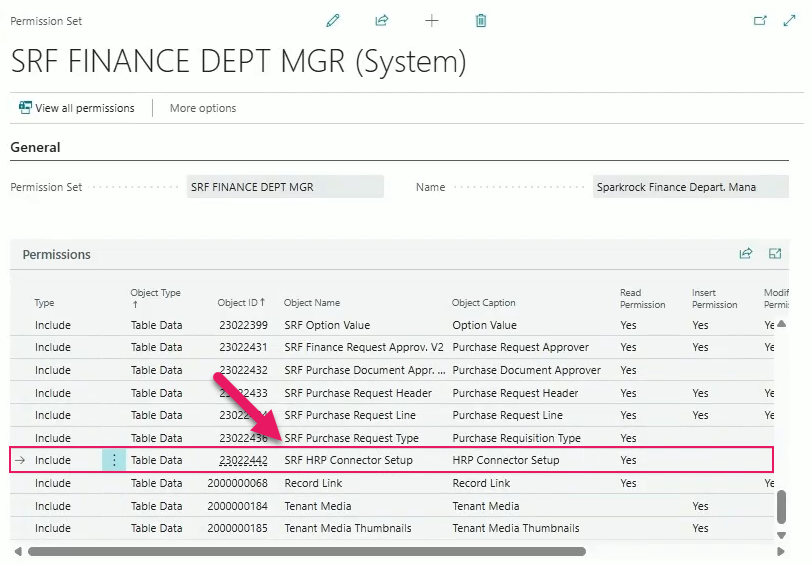
The Sparkrock Finance Department Manager permission set is extended with read-only access to the HRP Connector Setup page.
Learn more
- Set up a Sparkrock EdHRP integration
PD-7085, PD-7096, PD-7098, PD-7099, PD-7100, PD-7101, PD-7147, PD-7148, PD-7149, PD-8284, PD-8300, PD-8307, PD-8308, PD-8309, PD-8310, PD-8776, PD-8777, PD-8778, PD-8810
HR Management
Default plan option for benefit plans
This release introduces the capability to specify a default benefit plan option, so that you do not need to manually select the same plan option every time you add a benefit plan to a new hire HR request.
New benefit plan option default checkbox
On the Benefit Plan Options page, a new Default checkbox column provides the capability to specify the plan option that applies most often for a benefit plan, for example Single for a plan where most employees choose that option.
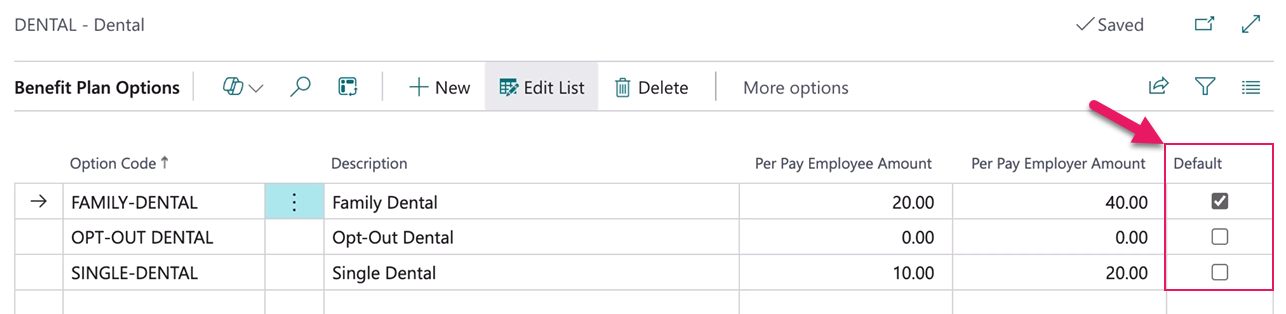
Only one plan option per benefit plan can have Default selected at a time. When you select Default for a plan option, Default is automatically cleared for any other plan option on the same benefit plan. Setting a default is optional. If no plan option has Default selected, Sparkrock Impact behaves the same as previous releases.
New hire HR request changes
On a new hire HR request, on the Employee Benefits FastTab, when you select a benefit plan that has a default plan option configured, the Benefit Plan Option field is automatically populated with the default.
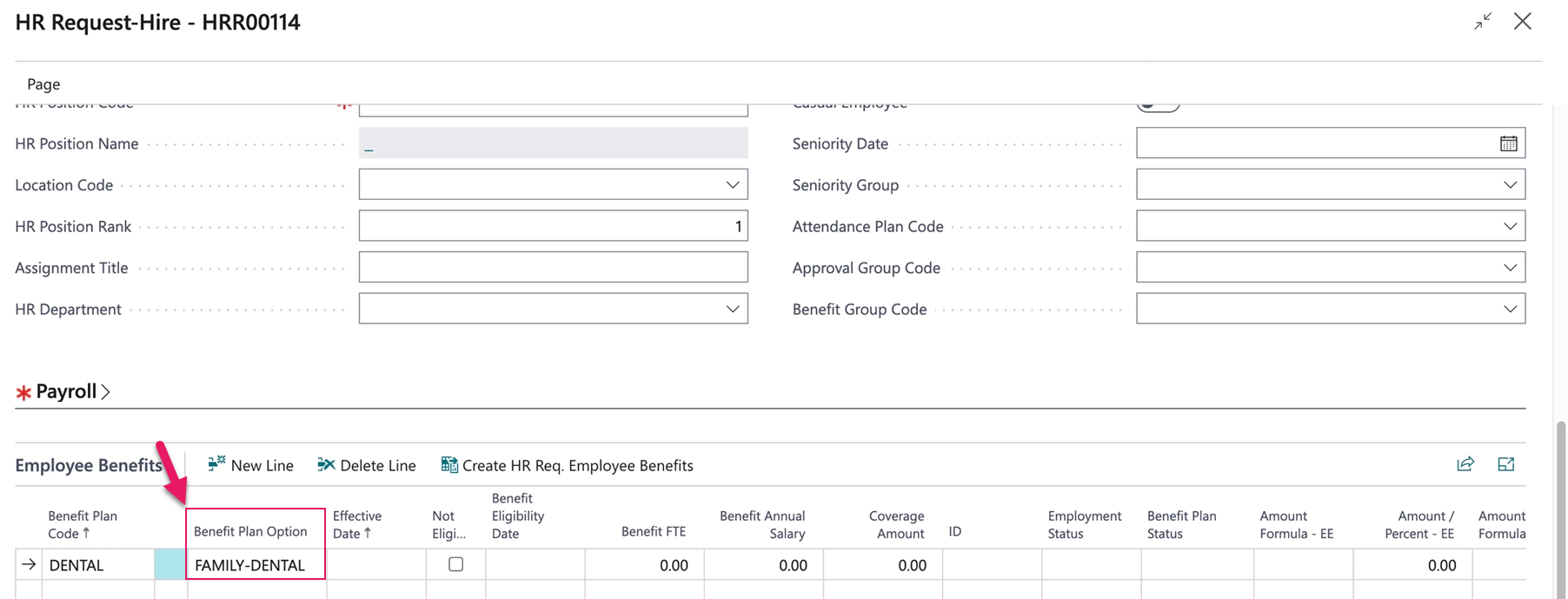
The field remains editable, so you can select a different plan option for that employee if needed. If the benefit plan that you select does not have a default plan option configured, the Benefit Plan Option field remains blank, which is the same behavior as previous releases.
Learn more
- Set up benefit plan options
- Hire or rehire employees
PD-8404, PD-8405
Show on mySparkrock field for benefit plans
On the Benefit Plans page, this release introduces a Show on mySparkrock checkbox that provides the capability to specify whether a benefit plan is visible to employees on mySparkrock.

When Show on mySparkrock is selected, the benefit plan is visible to employees on mySparkrock. When Show on mySparkrock is clear, the benefit plan is not visible to employees on mySparkrock. Show on mySparkrock is selected by default for new and existing benefit plans.
Note
Note:
The mySparkrock user interface components that use this configuration will be available in a future mySparkrock release.
Learn more
- Set up benefit plans
PD-8407
Employee benefits action relabelled
On the Employees and Employee Card pages, this release renames the Employee Benefits action label to Employee Benefits & Deductions to better reflect the action's scope.
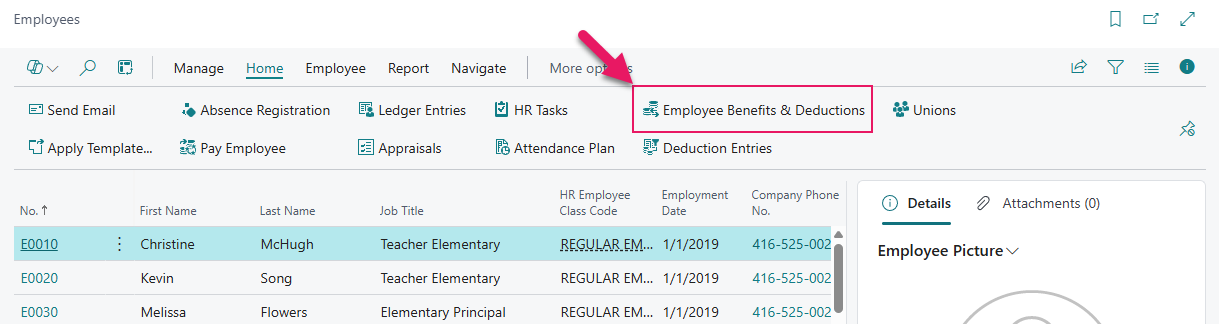
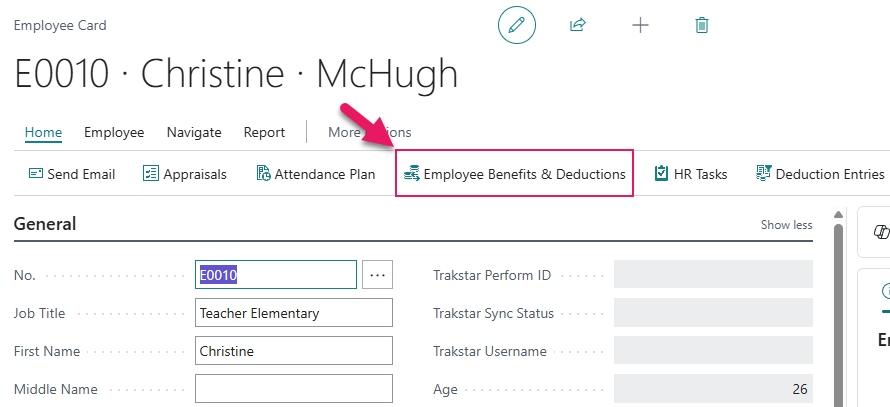
Navigation for this action is unchanged.
Problems that are resolved in this update
The following problems are resolved in this update.
Finance and Procurement
| Description | |
|---|---|
| The Sparkrock Impact API that shares purchase requisition and payment request template data with mySparkrock does not include the total amount including tax. As a result, the total amount including tax that is displayed in mySparkrock does not match the total amount including tax in Sparkrock Impact. |
Financial Analysis
| Description | |
|---|---|
| The Sparkrock Impact API that shares financial analysis commitments and encumbrances data with mySparkrock does not include vendor name data. |
HR Management
| Description | |
|---|---|
| On the Compensation Journal page, when you manually create a journal line or import lines from Excel, Sparkrock Impact does not populate the Payment Date field. As a result, the Payment Date field on the resulting compensation ledger entry is blank. To resolve this problem, Sparkrock Impact now populates the Payment Date field based on the HR pay cycle when you create a journal line. Note: Existing compensation ledger entries with a blank Payment Date are not automatically corrected by this fix. |
|
When an assignment ends before the end of the accrual year, the following problems exist with prorated accruals:
|
|
| On the Annual Accrual Worksheet page, when an employee is hired and their attendance plan has both Prorated by FTE and First Year Prorated selected, Sparkrock Impact does not calculate an accrual amount for the employee. This problem also occurs when you post a hire. To resolve these problems, Sparkrock Impact now calculates the correct prorated accrual amount for employees hired after the accrual year start. |
Related information
New for Sparkrock Impact
Finance and Procurement updates
Financial analysis updates
HR Management updates
Version 28.1 for Sparkrock Impact 2026 release wave 1 release notes
Feedback
To send feedback about this page, select the following link: