
Update 28.1.2633.808 Published August 14, 2026
Periodically, Sparkrock may publish updates between major releases. All updates are cumulative.
Highlights
The following sections highlight the major accomplishments in this update.
Finance and Procurement
HR Management
New features and changes
Update 28.1.2633.808 for Sparkrock Impact 2026 release wave 1 introduces the following new features and changes.
Finance and Procurement
Expense claim attribute field tooltip text
On the Attributes - SRF Expense Type page, this release adds a Tooltip Text field.
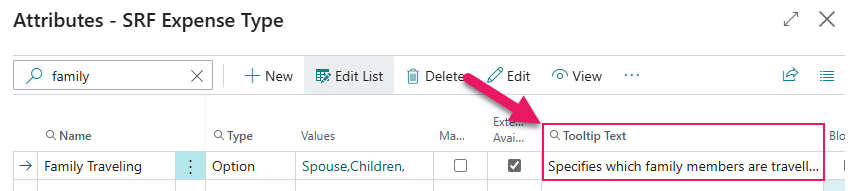
Finance administrators can enter guidance text of up to 500 characters on each attribute field definition, so that employees see contextual help when completing custom fields on an expense claim in mySparkrock.
The Tooltip Text field is available on each attribute field definition row where the attribute is linked to an expense claim. Leaving the Tooltip Text field blank is valid. When the field is blank, no tooltip is displayed in mySparkrock for that field.
Note
Note:
The mySparkrock user interface components that display this tooltip text will be available in a future mySparkrock release.
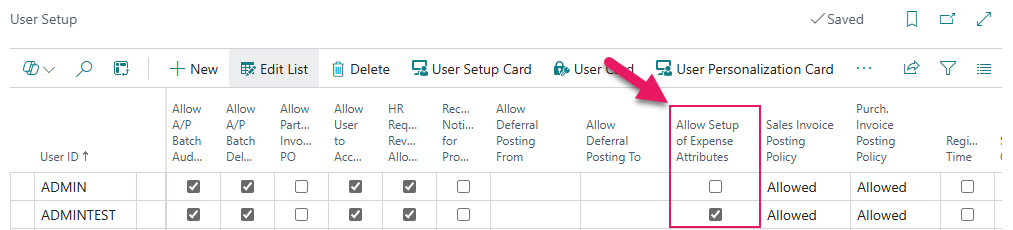
The Tooltip Text field is only available to users who have the Allow Setup of Expense Attributes checkbox selected on their User Setup record.
Learn more
- Set up expense attribute fields
PD-8608, PD-8609
HR Management
Trakstar Perform integration
This release introduces a one-way integration between Sparkrock Impact and Trakstar Perform. When the integration is enabled, changes to an employee's job title, reporting line, and termination status in Sparkrock Impact are automatically synchronized to Trakstar Perform in the background, with no additional action required from HR administrators.
Setup
To support this feature, this release introduces a Trakstar Perform Setup page.
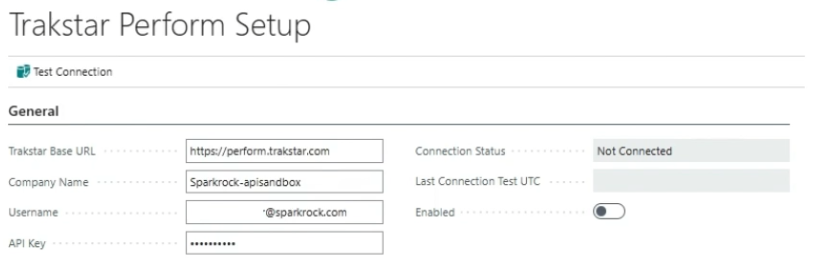
To set up the integration, on the Trakstar Perform Setup page, enter the following connection details:
- Trakstar Base URL
- Company Name
- Username
- API Key
The API Key field is always masked and is stored securely.
After the connection details are entered, select Test Connection on the action bar. Sparkrock Impact contacts the Trakstar Perform server and returns Connected or Not Connected in the Connection Status field, along with the date and time of the test in Last Connection Test UTC. If the credentials or company name are incorrect, or if Trakstar Perform is unavailable, a message describes what went wrong.
The Enabled toggle activates the integration and can only be turned on after a successful connection test. When Enabled is turned on, the credential fields become read-only. To update the credentials, turn off Enabled first.
Job titles in Sparkrock Impact map to review templates in Trakstar Perform, and the names must match exactly. Before turning on Enabled, ensure that job titles are in sync with the review templates. If no matching Review Template exists for an employee's job title, the sync completes but the employee's Review Template in Trakstar Perform is left blank.
Permissions
A new SRW TRAKSTAR PERFORM, SETUP permission set is introduced. Assign this permission set to administrators who need access to the Trakstar Perform Setup page.
The existing SRW HR BASIC permission set is extended with read-only access to the Trakstar Perform setup information so that background sync processing can check whether the integration is enabled.
New SRW Trakstar Perform Sync job queue entry
This release introduces a new SRW Trakstar Perform Sync job queue entry (Object ID to Run = 23069059) that processes background sync requests to Trakstar Perform.
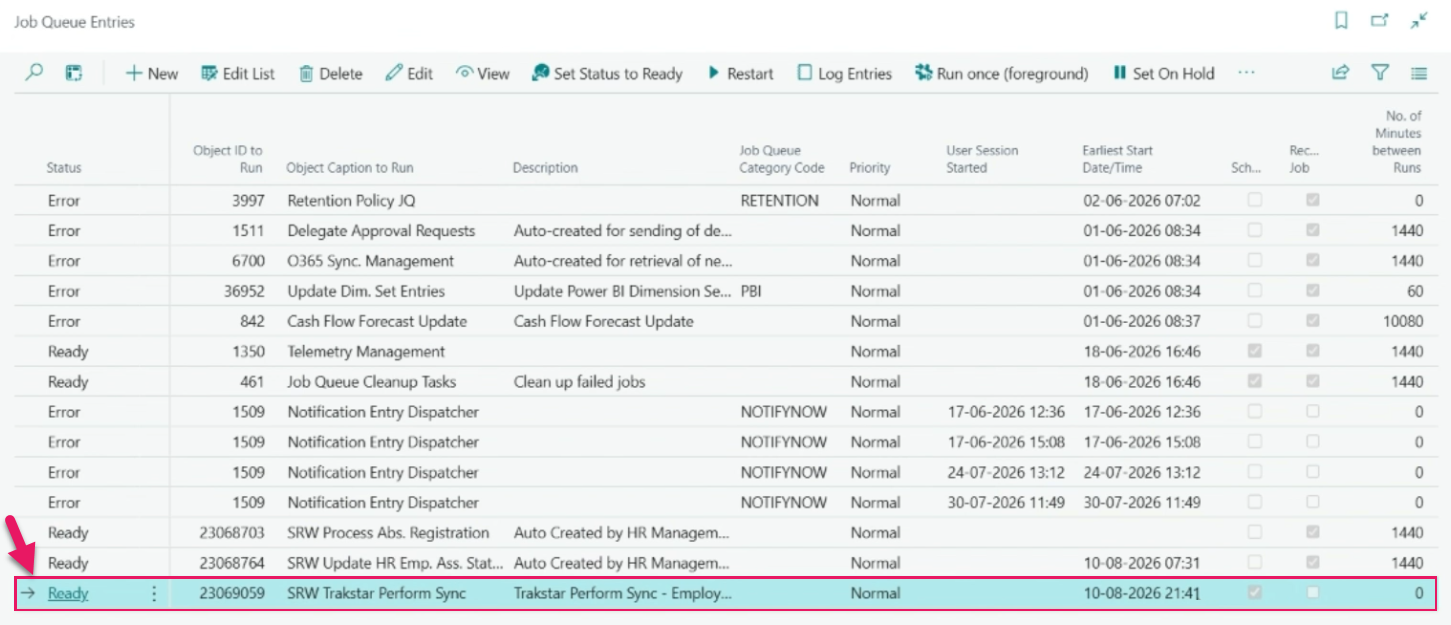
The job queue entry runs automatically when a sync is queued and retries failed attempts up to five times before recording an error on the Job Queue Log Entries page.
Automatic synchronization
When the integration is enabled, the following changes in Sparkrock Impact trigger an automatic background sync to Trakstar Perform:
- Job title change: When an employee's job title changes as a result of an HR request such as a transfer, assignment change, or details change, the corresponding Trakstar Perform Review Template is updated. If the employee has an active review under the prior Review Template, Trakstar Perform cancels the review. A new review under the updated template is not assigned automatically. That step is completed in Trakstar Perform. When an HR request has a future effective date, the sync occurs on the effective date, not on the date the request was approved.
- Manager change: When an employee's reporting line changes for an HR employee assignment, the employee's manager is updated in Trakstar Perform.
- Manager position holder change: When the person holding a manager-level HR position changes, every direct report of that position has their Trakstar Perform manager updated to the new position holder automatically.
- Termination: When an employee's status changes to terminated, the employee's Trakstar Perform account is deactivated automatically.
Sync attempts that fail are retried automatically. Both successful and failed sync outcomes are recorded on the Job Queue Log Entries page.
Manual synchronization
When the integration is enabled, an Update on Trakstar Perform action is available on the action menu, on the Employees and Employee Card pages.
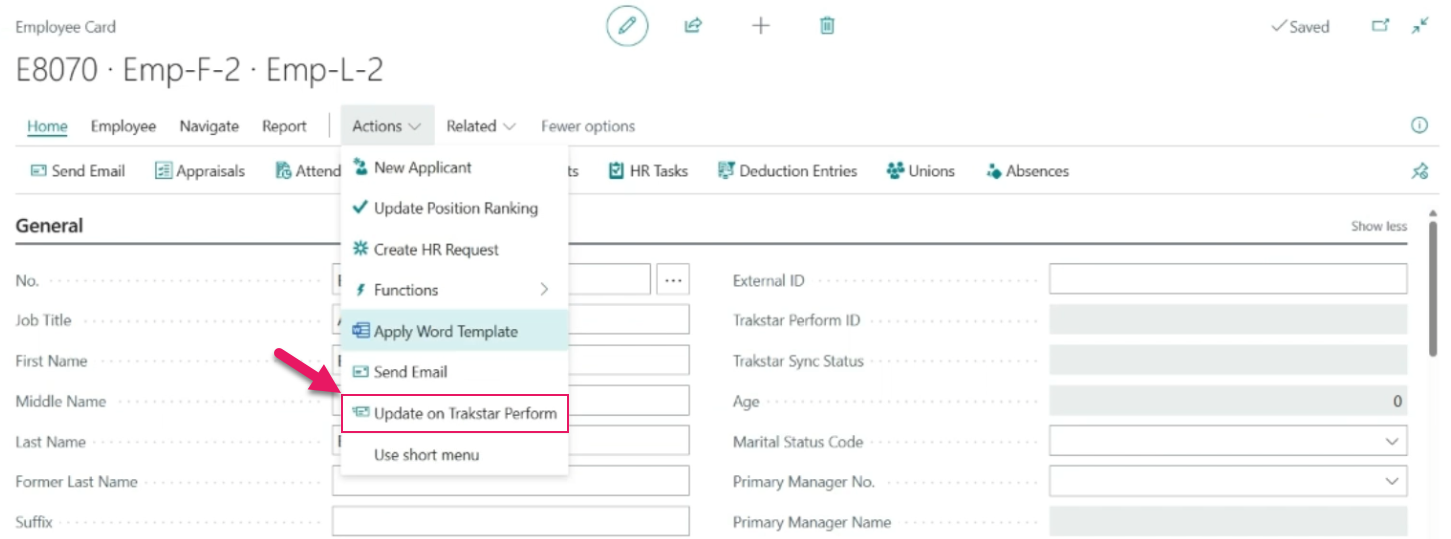
When you select this action, Sparkrock Impact performs an on-demand sync for the selected employee or employees. To sync multiple employees at once, select one or more employees on the Employees page before selecting the action. A confirmation message tells you how many syncs were queued.
Employees who already have a pending sync are skipped so that duplicate syncs are not created.
Employee sync status
To track employee sync status, new Trakstar Perform ID and Trakstar Sync Status fields are available on the Employees and Employee Card pages.
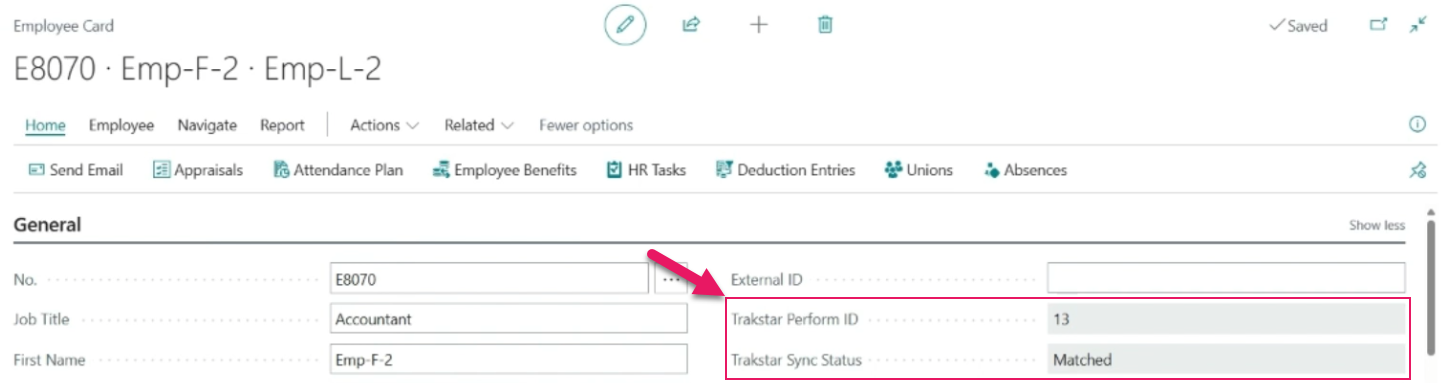
The Trakstar Perform ID field displays which employees have been matched to a Trakstar Perform account. Accounts are matched by company email address.
The Trakstar Sync Status field displays one of the following values:
- Matched: The employee has been matched to a Trakstar Perform account.
- Not Matched: The sync ran but no matching Trakstar Perform account was found. A missing or incorrect company email address is usually the cause.
- Blank: If the field is blank, the sync has never run for this employee.
You can filter and sort the Employees page on this field to identify employees that need attention. After correcting the underlying data, select Update on Trakstar Perform to re-sync the employee.
Note
Note:
This integration keeps existing Trakstar Perform accounts up to date. An employee must already have a Trakstar Perform account before any sync applies to them. Employee account creation in Trakstar Perform is handled by Azure AD. Creating Trakstar Perform accounts directly from Sparkrock Impact is planned for a future release.
Learn more
- Trakstar Perform integration
PD-8354, PD-8355, PD-8356, PD-8357, PD-8358, PD-8359, PD-8360, PD-8361, PD-8362, PD-8363, PD-8364, PD-8365, PD-8686, PD-8689, PD-8692, PD-8693, PD-8757, PD-8758
Problems that are resolved in this update
The following problems are resolved in this update.
Finance and Procurement
| Description | |
|---|---|
| Due to a Sparkrock Impact API not sharing the correct data with mySparkrock, purchase orders that have been fully received do not appear on the Purchase Orders and Receiving page in mySparkrock. To resolve this problem, the Sparkrock Impact API now shares the correct data so that all purchase orders are visible, regardless of their receiving status. |
|
| Due to a Sparkrock Impact API not sharing the correct data with mySparkrock, when you open a posted purchase invoice in mySparkrock, only the first invoice line appears even when the invoice has multiple lines. A separate security problem also exists with how Sparkrock Impact applies security filters to posted purchase invoice lines. |
|
| Due to a Sparkrock Impact API not sharing the correct data with mySparkrock, private purchase requisition templates and private payment request templates do not appear in mySparkrock. |
|
| When you open the Purchase Invoices page in mySparkrock, the page may take an excessive amount of time to load when security filters are configured in Sparkrock Impact. |
|
| When you open the Purchase Requisitions page in mySparkrock, the page may take an excessive amount of time to load when security filters are configured in Sparkrock Impact. |
|
| When you send a finance request for approval, Sparkrock Impact may take an excessive amount of time to process or may stop responding due to slow budget checking. |
HR Management
| Description | |
|---|---|
| When an absence request spans multiple days, the SRW Process Abs. Registration job (Object ID to Run = 23068703) may only register absences up to the start date of the request. As a result, the remaining days of the absence are not registered. |
Related information
New for Sparkrock Impact
Finance and Procurement updates
HR Management updates
Version 28.1 for Sparkrock Impact 2026 release wave 1 release notes
Feedback
To send feedback about this page, select the following link: