
Update 28.1.2634.827 Published August 21, 2026
Periodically, Sparkrock may publish updates between major releases. All updates are cumulative.
Highlights
The following sections highlight the major accomplishments in this update.
Finance and Procurement
HR Management
Time Entry
New features and changes
Update 28.1.2634.827 for Sparkrock Impact 2026 release wave 1 introduces the following new features and changes.
Finance and Procurement
Expense claim Tax Area Code on claim header
This release gives finance administrators the ability to correct the tax jurisdiction on an expense claim in a single step, without editing each line individually.
Note
Note:
The mySparkrock user interface components that use this configuration will be available in a future mySparkrock release.
Setup
To turn on this feature, on the Purchases & Payables Setup page, on the Expense Claims FastTab, in the mySparkrock Settings group, turn on Tax Area Code on Claim Header.
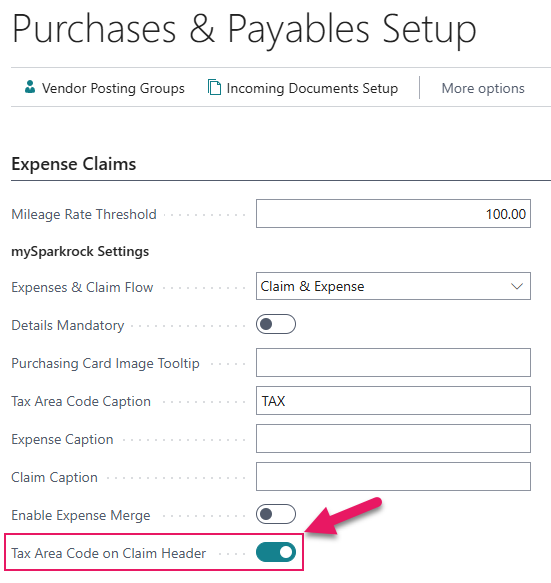
When the toggle is turned off, the Tax Area Code field is hidden on the General FastTab of an expense claim and the feature is not available. Turning the toggle off does not remove any Tax Area Code values that are already saved.
How it works
When Tax Area Code on Claim Header is turned on, a Tax Area Code field appears on the General FastTab of an expense claim.
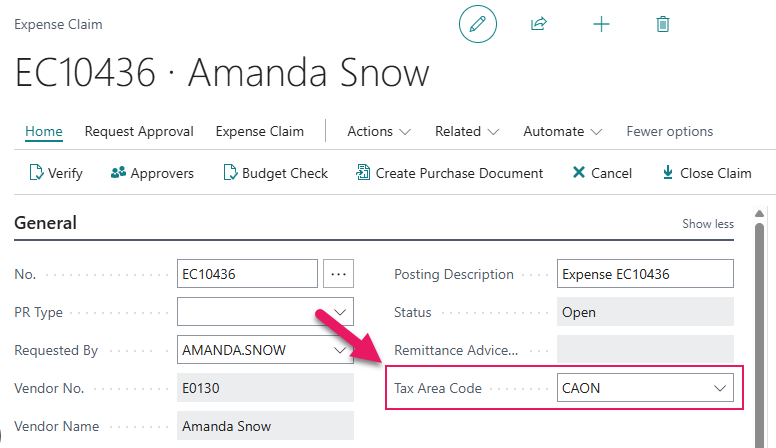
The dropdown is filtered to tax area codes that are marked as available for expense claims.
The Tax Area Code field is editable when the claim status is Open or Approved. The field is read-only when the claim status is Pending Approval, In-Progress, Completed, or Cancelled.
When you select a Tax Area Code on the General FastTab, the following message appears:
Changing the Tax Area Code will update all lines on this claim. Do you want to continue?
Selecting Yes updates the Tax Area Code values on all existing claim lines and recalculates tax amounts and totals. Selecting No reverts the Tax Area Code field on the General FastTab to its previous value and no lines are changed.
When a new line is added to a claim that has a Tax Area Code set on the General FastTab, the Tax Area Code on the new line is automatically populated with the value that is set on the General FastTab. The line-level Tax Area Code can be changed independently without affecting the value on the General FastTab or other lines.
Learn more
- Set up Tax Area Code on expense claim header
PD-8627, PD-8629, PD-8631, PD-8632, PD-8633, PD-8635
Purchase invoice local currency equivalent fields
This release updates the purchase invoice API that shares data with mySparkrock to include local currency equivalent amounts at the line level and the local currency code at the invoice general level.
For local currency invoices where no foreign currency is set, the local currency equivalent fields return the same values as the corresponding foreign currency fields.
Note
Note:
The mySparkrock user interface components that use this data will be available in a future mySparkrock release.
Purchase orders and receiving API local currency amount fields
This release adds local currency equivalent fields to the purchase orders and receiving API that shares data with mySparkrock. These fields are read-only and are computed from the document's transaction amounts and exchange rate, using the same pattern that is already used by the purchase invoices API.
For documents in the company's local currency, the local currency equivalent fields return the same values as the corresponding transaction currency fields. For multi-currency documents, the local currency equivalent values reflect the converted amounts based on the document's exchange rate.
Note
Note:
The mySparkrock user interface components that use this data will be available in a future mySparkrock release.
Problems that are resolved in this update
The following problems are resolved in this update.
Finance and Procurement
| Description | |
|---|---|
| The Purchase Requisitions, Purchase Invoices, Payment Requests, and Purchase Orders and Receiving pages in mySparkrock may take an excessive time to load due to Sparkrock Impact APIs not sharing row count data with mySparkrock quickly enough. |
|
| Due to a Sparkrock Impact API not sharing the correct data with mySparkrock, when you are set up as an alternate for another approver, that approver's requests to approve may display in your own approval list in mySparkrock without any indication of whose request each one is. As a result, you may not be able to determine which requests to approve belong to the person you are an alternate for. |
HR Management
| Description | |
|---|---|
| When a user submits a profile change in mySparkrock, Sparkrock Impact records the submission date and time in Coordinated Universal Time (UTC) instead of the user's local time zone. As a result, the submission timestamp that is displayed on the mySparkrock Change Entries page may not match the time the user submitted the change. To resolve this problem, Sparkrock Impact now records the submission date and time in a single Request Date/Time field that displays in the user's local time zone. |
Time Entry
| Description | |
|---|---|
| When you submit an absence request with different hours for different days, Sparkrock Impact averages the hours across the entire absence request. As a result, the Time Sheet Entry page may display an incorrect number of hours for each day instead of the hours that are entered for that specific day. To resolve this problem, Sparkrock Impact now displays the hours that are entered for each day of the absence request. |
Related information
New for Sparkrock Impact
Finance and Procurement updates
HR Management updates
Time entry updates
Version 28.1 for Sparkrock Impact 2026 release wave 1 release notes
Feedback
To send feedback about this page, select the following link: